
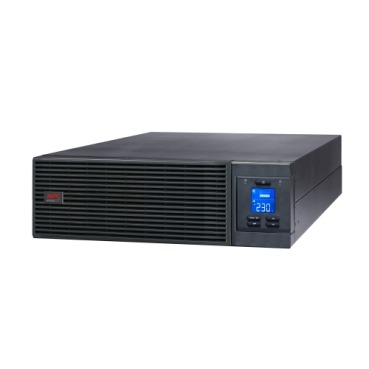
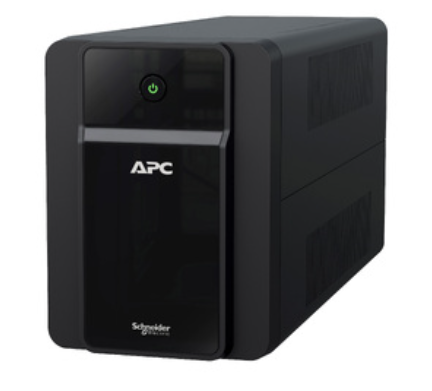
Not all APC extended warranty packs are the same. A ₹4,500 Back-UPS protecting a home PC and a ₹1.5 lakh Smart-UPS Online running a server rack don’t carry the same risk, downtime cost, or service expectation — so APC structures its extended warranty pack range very differently across these two tiers. If you’re about to renew or buy cover for the first time, understanding this split will stop you from either overpaying for a home UPS or under-protecting a business-critical one.
Why APC Sells Different Extended Warranty Packs for Different UPS Tiers
APC’s warranty extension program is built around risk and recovery time. A Back-UPS failure usually means a few hours of inconvenience at home. A Smart-UPS or Easy-UPS Online failure in a server room can mean a business standstill, data loss, or SLA penalties with clients. Naturally, the extended warranty packs for the two categories differ in service type, response commitment, and what internal parts they actually cover.
Back-UPS Extended Warranty: What You Typically Get
- Service type: Mostly carry-in or pick-and-drop through an authorised service centre, not onsite
- Coverage: The UPS electronics and build — the battery remains a separate consumable, covered only partially or not at all beyond the original period
- Duration options: Usually 1 or 2 years added on top of the standard warranty
- Best suited for: Single Back-UPS units used for PCs, routers, printers, or small home offices
Smart-UPS / Easy-UPS Online Extended Warranty: What’s Different
- Service type: Onsite visits are common, often with a defined response SLA (same-day, next-business-day, or 4/8-hour depending on the plan)
- Coverage: Includes internal modules, power boards, and in some plans preventive maintenance visits — not just a swap-out
- Duration options: Extensions can often be stacked up to 3-5 years depending on the model and available packs
- Best suited for: Businesses running servers, networking racks, billing systems, or any load where downtime has a direct cost
Side-by-Side Comparison
| Factor | Back-UPS Extended Warranty | Smart-UPS/Online UPS Extended Warranty |
|---|---|---|
| Typical service mode | Carry-in / courier pickup | Onsite engineer visit |
| Response commitment | Best-effort, no fixed SLA | Defined SLA (4-hr/8-hr/NBD options) |
| What’s covered | Main UPS unit electronics | UPS unit + internal cards/modules, sometimes preventive checks |
| Battery coverage | Usually separate, limited | Often bundled or available as add-on |
| Typical buyer | Home user, freelancer, single PC/router setup | Business, data centre, multi-UPS office |
How to Choose the Right Pack for Your UPS Model
- Identify the exact model number printed on the UPS label — BX, BR, BVX, SMT, SMC, SRV or SRT, since the warranty pack SKU is model-specific
- Match VA/kVA rating to the pack, as higher-capacity units often need a different extension SKU than lower-capacity siblings
- Decide onsite vs carry-in based on how critical the load is — a router at home can wait for carry-in service, a server cannot
- Check if the plan includes battery cover, especially for Smart-UPS Online units where internal battery packs are expensive to replace separately
- Buy before the original warranty lapses wherever possible — pricing and eligibility are usually better before expiry
You can browse current APC extended warranty packs by model and duration to shortlist the right SKU for your unit before checkout.

Why This Split Pays Off for Businesses
Paying slightly more for an onsite, SLA-backed extended warranty pack on a Smart-UPS or online UPS is rarely wasted money. The cost of a technician visit and part replacement, if it happened out-of-pocket during a failure, usually exceeds the warranty premium many times over — especially when you factor in lost productivity, data risk, or client SLA breaches. For a home Back-UPS, the calculation is different: a simpler carry-in plan is usually enough since the stakes and repair complexity are lower.
Buying Warranty Packs for Multiple UPS Units
If your office runs a mix of Back-UPS units at desks and a Smart-UPS Online in the server room, you don’t need to buy identical plans for everything. Match each unit to its appropriate tier, and if you’re procuring for several units at once, our instant quotation tool lets you add multiple UPS and warranty pack line items together and get a single GST-inclusive PDF quote in about a minute — useful when finance or procurement needs one consolidated document instead of several invoices.
Can I buy a Smart-UPS-style onsite warranty for my Back-UPS?
No. Extended warranty packs are tied to specific model families, so a Back-UPS cannot be covered under an onsite Smart-UPS SLA plan. Each pack is designed and priced for its specific product line.
Does the extended warranty cover the battery inside a Smart-UPS Online?
It depends on the specific pack. Some extension SKUs for online UPS units include internal battery modules; others treat the battery as a separate consumable. Always confirm this before purchase rather than assuming.
Is onsite service always better than carry-in?
Not necessarily for every buyer — it’s better when downtime cost is high, like in a server room. For a single home PC backup, carry-in service is usually fine and more economical.
Can I upgrade from a carry-in plan to onsite later?
Generally no — the service type is fixed to the pack you purchase for that model. If your usage has shifted from home to business-critical, it’s worth checking available onsite SKUs for your model at the time of renewal.
Shop what this guide covers
- APC Back-UPS — for home & small officeLine-interactive UPS for desktops, Wi-Fi routers, CCTV and billing machines.
- APC Smart-UPS & online UPSDouble-conversion, pure sine-wave power for servers, racks and critical loads.
- APC extended warranty packsExtend cover on your UPS by 1 to 3 years, registered to your serial number.
- Build an instant APC UPS quotationGST worked out, freight to your pincode, numbered PDF emailed in about a minute.
What size UPS do I need? »Find the battery for my UPS »Ask us on WhatsApp
Related guides
- What Determines the Price of an APC Extended Warranty Pack in India? (2026 Buyer’s Guide)
- Can You Buy an APC Extended Warranty Pack After Your UPS Warranty Has Already Expired? (India 2026 Guide)
- Tower vs Rack-Mount APC Smart-UPS Online: Which Form Factor Should You Buy for Your Server Room? (India 2026)
- Does APC Extended Warranty Transfer If You Sell, Relocate or Upgrade Your UPS? (India 2026 Guide)
- Standard Runtime vs Long Runtime APC Smart-UPS Online: Which Should You Buy for Your Server Room? (India 2026)
All UPS & power-backup guides · APC battery replacement chart · APC UPS dealer in your city