

If you’re shopping for power backup for your home or small office, you’ve probably landed on this question: should you buy an APC Back-UPS or a traditional inverter-battery trolley? Both keep the lights on during a power cut, but they’re built for very different jobs. Choosing wrong means either overpaying for a system that can’t run your fridge and tube lights, or underusing an inverter that’s too slow and noisy to protect your PC. This guide breaks down the real difference in a UPS vs inverter decision so you buy the right one the first time.

What Is the Real Difference Between a UPS and an Inverter?
An APC Back-UPS is a line-interactive UPS. It constantly monitors incoming mains and switches to battery in milliseconds (typically under 10ms) the moment power fails or voltage goes out of range. A home inverter, on the other hand, is designed to switch over in a fraction of a second too, but most budget trolley inverters take noticeably longer (50ms to 500ms) and don’t offer the same voltage regulation (AVR) that protects sensitive electronics from brownouts and spikes.
Switching Time: Why It Matters for Your Computer and Router
A desktop PC, Wi-Fi router, smart TV or CCTV DVR can reboot, lose unsaved work, or corrupt data if the switchover takes too long. This is exactly why APC Back-UPS units are built around fast transfer times and automatic voltage regulation — they’re meant to sit between your electronics and the wall socket, not power your entire house. A standard inverter is perfectly fine for fans, tube lights and a TV, where a brief flicker doesn’t matter, but it’s a risky choice for a work laptop charger, gaming PC or a server-grade NAS.
Backup Time and Battery Capacity Compared
This is where most buyers get confused. Inverters are usually paired with large tubular batteries (100Ah–150Ah) that can run multiple fans, lights and a fridge for 4–8 hours. An APC Back-UPS, even a 1100VA model like the BX1100i, is sized for short, critical backup — typically 15 minutes to an hour for a PC, router and a couple of lights, not an entire evening of mixed home load. If you need long backup for heavy appliances, an inverter (or a UPS paired with an extended battery module) is the better fit.
| Parameter | APC Back-UPS (Line-Interactive) | Home Inverter |
|---|---|---|
| Switching time | Under 10ms (near-seamless) | 50–500ms typical |
| Voltage regulation (AVR) | Yes, built-in on most Back-UPS models | Rare on budget models |
| Best suited load | PC, router, modem, CCTV, set-top box | Fans, tube lights, TV, fridge |
| Typical backup time | 15 min–1 hr (standard battery) | 4–8 hrs (large tubular battery) |
| Noise | Silent to near-silent | Audible hum, battery gas smell possible |
| Maintenance | Sealed, maintenance-free battery | Needs periodic water top-up (flooded types) |
Noise, Installation and Maintenance
APC Back-UPS units use sealed lead-acid batteries that need no topping up and sit quietly under a desk. Inverters with flooded tubular batteries need ventilation, periodic distilled water refills, and produce a low hum under load. If your UPS or inverter will sit in a bedroom or small home office, the lower noise and zero-maintenance nature of a Back-UPS is a real advantage.
Which One Should You Actually Buy?
- Only protecting a PC, Wi-Fi router, modem and CCTV: Buy an APC Back-UPS. A 600VA–850VA unit comfortably covers a router, ONT and DVR for an hour or more.
- Running fans, lights, TV and fridge through long outages: A home inverter with a larger battery bank is more practical and cost-effective per hour of backup.
- Both scenarios in the same home: Many Indian households run an inverter for general lighting and a separate small APC Back-UPS dedicated to the study/work-from-home corner, so a flicker during inverter changeover never touches the PC.
- Small office with desktops, printers and a few workstations: A line-interactive UPS sized per desk is usually safer and easier to manage than one oversized inverter for the whole office.
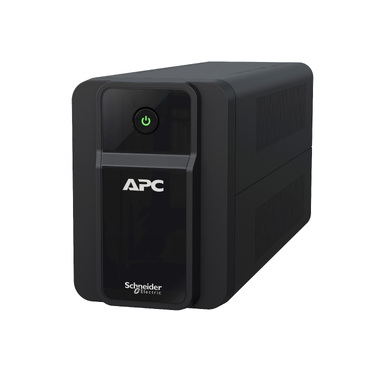
Small Offices: Do You Need Both?
For small offices, the common setup is a voltage-stabilised mains supply feeding individual line-interactive UPS units at each workstation, rather than relying on one large inverter for the whole floor. You can browse APC’s range of line-interactive UPS systems to find VA ratings suited to desktops, routers and billing counters. If you’re buying multiple units for an office and need a formal quotation with GST and freight for internal approvals, APC India Partner Store’s instant quotation builder generates a numbered PDF in about a minute without waiting on a salesperson.
Frequently Asked Questions
Can an APC Back-UPS run my fridge or AC during a power cut?
No. Back-UPS units are sized for short backup of sensitive electronics like PCs and routers, not high-wattage appliances with heavy starting surges like fridges, ACs or water pumps. For those, a correctly sized inverter or a dedicated industrial UPS is needed.
Is a UPS better than an inverter for protecting my computer?
Yes, for electronics specifically. The near-instant switching and built-in voltage regulation in an APC Back-UPS protect your PC and router from both outages and voltage fluctuations far better than a standard inverter.
Can I replace my inverter battery with a UPS battery, or vice versa?
Not directly — Back-UPS units typically use sealed, maintenance-free batteries sized for their internal charger, while most home inverters use larger flooded or tubular batteries. Always use the correct APC RBC replacement battery matched to your UPS model rather than substituting an inverter battery.
Do I need both a UPS and an inverter at home?
Many Indian homes do — an inverter for general lighting, fans and the fridge, and a separate, smaller APC Back-UPS dedicated to the work-from-home desk, router and CCTV, so critical electronics never experience the changeover delay of the main inverter.
Shop what this guide covers
- Genuine APC RBC replacement batteriesFactory-sealed APC Replacement Battery Cartridges with full manufacturer warranty.
- APC Back-UPS — for home & small officeLine-interactive UPS for desktops, Wi-Fi routers, CCTV and billing machines.
- Build an instant APC UPS quotationGST worked out, freight to your pincode, numbered PDF emailed in about a minute.
What size UPS do I need? »Find the battery for my UPS »Ask us on WhatsApp
Related guides
- How Long Can an APC Back-UPS Power Your Wi-Fi Router & CCTV During a Long Power Cut? (India 2026 Sizing Guide)
- APC Back-UPS vs APC Easy-UPS BVX: Should You Buy a Lithium-Ion UPS for Home or Office in India? (2026)
- Cold-Start Feature in APC Back-UPS: Why It Matters for Wi-Fi Routers & CCTV During Long Power Cuts (India 2026)
- APC Back-UPS Model Numbers Decoded: What BX, BV, BR & BVX Codes Mean Before You Buy (India 2026)
- Ideal Load Percentage for Your APC Back-UPS: How Much Headroom Should You Buy in 2026? (India Guide)
All UPS & power-backup guides · APC battery replacement chart · APC UPS dealer in your city