

Most Indian buyers choose an APC Back-UPS by asking “how many VA do I need for my devices” — but that’s only half the sizing problem. The other half, which almost nobody checks before buying, is how long and how often the power actually goes out at their specific address. A techie in a Bengaluru apartment with 2-minute flicker cuts needs a very different UPS from a shop owner in a small town with 3-hour scheduled load-shedding. Getting this wrong means either overpaying for battery capacity you’ll never use, or buying a UPS that dies 20 minutes into every outage. This guide walks through how to size your APC Back-UPS backup time around your real power-cut pattern, not just your equipment wattage.

Why VA Rating Alone Doesn’t Tell You Backup Time
VA rating tells you how much load a UPS can support at a given moment — it says nothing about how long it can sustain that load. Two 1100VA Back-UPS units can deliver completely different runtimes depending on their internal battery Ah rating, the actual load connected, and the battery’s age. So before shortlisting a model, the smarter first question is: “How many minutes or hours does power usually stay off at my location?”
Step 1: Actually Track Your Outage Pattern for a Week
Don’t guess — note it down for 5-7 days, including weekends:
- How many times did the power go in a day?
- How long did each cut last (use your phone’s clock)?
- Were cuts random (grid faults, storms) or scheduled (DISCOM load-shedding)?
- Did voltage flicker/fluctuate even when power didn’t fully cut (common in rural and semi-urban feeders)?
This single week of data will save you from both under-buying and over-buying capacity.
Matching Your Pattern to an APC Back-UPS
Once you know your pattern, match it against typical scenarios below. These are realistic ranges for a Back-UPS running a desktop PC, monitor, Wi-Fi router and a couple of lights — not an exhaustive load calculation, but a practical starting point.
| Your Power Cut Pattern | Typical Duration | Recommended Approach |
|---|---|---|
| Frequent short flickers/trips (urban, well-maintained grid) | Under 5 minutes | APC Back-UPS 600VA–850VA is often enough just to ride through the blink without a restart |
| Occasional outages, moderate load (PC + router + lights) | 20–45 minutes | APC Back-UPS 1100VA with standard battery |
| Daily scheduled load-shedding or storm-prone area | 1–3 hours | APC Back-UPS Pro 1500VA, or a 1100VA unit paired with an extra RBC battery pack for longer runtime |
| Long, unpredictable outages (semi-rural/industrial feeders) | 3+ hours | A UPS alone becomes impractical — pair with a home inverter or diesel backup; use the UPS only for sensitive electronics |
If your cuts regularly stretch past two to three hours, battery-only backup from a standard Back-UPS stops being cost-effective — you’d need an unreasonably large battery bank. In that case, treat the APC Back-UPS as protection for sensitive gear (PC, router, modem) during the transition, and rely on an inverter or generator for the bulk of the outage.
Don’t Forget Voltage Fluctuation, Not Just Outages
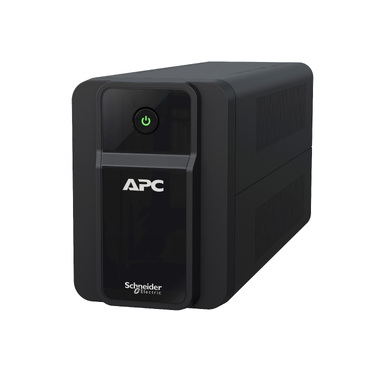
In many parts of India, the bigger problem isn’t the power going off completely — it’s voltage sagging and surging while it’s on. An APC Back-UPS with built-in AVR (Automatic Voltage Regulation) handles mild fluctuations without switching to battery, which actually preserves battery life over the years. You can browse the full range of APC line-interactive UPS models to compare AVR-equipped options suited to areas with unstable mains voltage.
Planning for an Office or Multiple Locations?
If you’re sizing Back-UPS units for a small office, branch network, or retail chain where outage patterns differ by city, it’s worth treating each location separately rather than buying one VA rating for everyone. Once you’ve shortlisted models per location, you can quickly generate a GST-inclusive quotation for the full list — including freight — using our instant quotation builder, without waiting on a sales call.
FAQ: APC Back-UPS Backup Time Sizing
Is it better to buy a bigger VA Back-UPS
Shop what this guide covers
- Genuine APC RBC replacement batteriesFactory-sealed APC Replacement Battery Cartridges with full manufacturer warranty.
- APC Back-UPS — for home & small officeLine-interactive UPS for desktops, Wi-Fi routers, CCTV and billing machines.
- Build an instant APC UPS quotationGST worked out, freight to your pincode, numbered PDF emailed in about a minute.
What size UPS do I need? »Find the battery for my UPS »Ask us on WhatsApp
Related guides
- APC Back-UPS vs Home Inverter: Which Should You Buy for Power Backup in India? (2026 Guide)
- How Long Can an APC Back-UPS Power Your Wi-Fi Router & CCTV During a Long Power Cut? (India 2026 Sizing Guide)
- Does an APC Line-R Stabilizer Protect You During a Power Cut? What It Can (and Can’t) Do in India (2026)
- Cold-Start Feature in APC Back-UPS: Why It Matters for Wi-Fi Routers & CCTV During Long Power Cuts (India 2026)
- How Many Times Can You Extend Your APC UPS Warranty? Maximum Coverage Period Explained (India 2026)
All UPS & power-backup guides · APC battery replacement chart · APC UPS dealer in your city
Shop what this guide covers
- Genuine APC RBC replacement batteriesFactory-sealed APC Replacement Battery Cartridges with full manufacturer warranty.
- APC Back-UPS — for home & small officeLine-interactive UPS for desktops, Wi-Fi routers, CCTV and billing machines.
- Build an instant APC UPS quotationGST worked out, freight to your pincode, numbered PDF emailed in about a minute.
What size UPS do I need? »Find the battery for my UPS »Ask us on WhatsApp
Related guides
- APC Back-UPS vs Home Inverter: Which Should You Buy for Power Backup in India? (2026 Guide)
- How Long Can an APC Back-UPS Power Your Wi-Fi Router & CCTV During a Long Power Cut? (India 2026 Sizing Guide)
- Does an APC Line-R Stabilizer Protect You During a Power Cut? What It Can (and Can’t) Do in India (2026)
- Cold-Start Feature in APC Back-UPS: Why It Matters for Wi-Fi Routers & CCTV During Long Power Cuts (India 2026)
- How Many Times Can You Extend Your APC UPS Warranty? Maximum Coverage Period Explained (India 2026)
All UPS & power-backup guides · APC battery replacement chart · APC UPS dealer in your city