

Most buyers researching an APC Line-R voltage stabilizer focus only on voltage range and VA capacity — and rightly so. But one practical question gets skipped until installation day: where is this box actually going to sit? An APC Line-R stabilizer comes in wall-mount, tabletop and rack-mount form factors, and picking the wrong one means drilled holes you didn’t need, a unit wobbling on a shelf, or a rack that won’t close its door. This guide walks through how to match the physical form factor to your space before you place an order.
Why Form Factor Matters as Much as Voltage Range
An APC Line-R stabilizer’s job is simple: it watches incoming mains voltage and corrects sags or surges using an automatic voltage regulation (AVR) transformer tap before power reaches your appliance. But the box housing that transformer has weight, ventilation needs, and cabling that behave very differently depending on where you put it. A stabilizer stuffed behind a TV unit with no airflow will run hotter and age faster than the same unit sitting in open space. A wall-mounted unit above a refrigerator saves floor space but needs secure anchoring because these units aren’t light. Getting the form factor right isn’t cosmetic — it affects both safety and service life.
The Three Common Form Factors
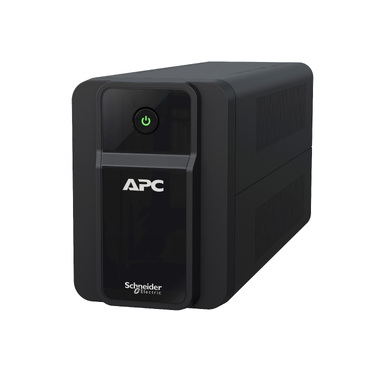
- Tabletop / desktop: Sits on a shelf, TV unit, or beside the appliance it protects. No drilling required, easiest to move later, and the most common choice for home refrigerators, TVs, and single-AC setups.
- Wall-mount: Fixed to the wall with brackets, usually near the meter board or close to where the appliance’s plug point is. Frees up floor and shelf space — useful in kitchens, utility rooms, and small offices where surface space is already tight.
- Rack-mount: Designed to slide into a standard 19-inch server rack alongside your APC Online UPS and networking equipment. Used almost exclusively in server rooms and data closets where every device needs to be bolted into the same enclosure for cable management and physical security.
Matching Form Factor to Where You’ll Actually Install It
| Location | Recommended Form Factor | Why |
|---|---|---|
| Kitchen (refrigerator) | Tabletop or wall-mount | Needs to sit near the socket without blocking the refrigerator’s rear ventilation gap |
| Living room (TV, set-top box) | Tabletop | Usually placed inside or beside a TV unit; easy access to check the display/indicator |
| Bedroom (split AC) | Wall-mount | Keeps the stabilizer off the floor, close to the outdoor unit’s power point, and out of foot traffic |
| Home office / WFH desk | Tabletop | Shares the desk with the PC and UPS, easy to monitor and reach the switch |
| Server room / IT closet | Rack-mount | Integrates with existing 19-inch racks holding your APC Online UPS and network gear |
| Retail shop (POS, billing counter) | Tabletop or wall-mount | Limited counter space; wall-mount keeps it out of the way of customers and staff |
Practical Installation Checks Before You Buy
- Measure the clearance. Stabilizers need a few inches of open space around the vents for heat to escape — don’t box one into a closed cabinet.
- Check cable reach. A wall-mounted unit placed too far from the appliance will need an extension cord, which adds resistance and partly defeats the purpose of clean, regulated power.
- Confirm the wall can take the load. Larger stabilizers (above 1 kVA) are heavier than they look; use proper anchors on brick or concrete walls, not hollow partition boards.
- For racks, confirm the U-height. Rack-mount stabilizers consume rack units (U) just like your UPS does — check this against your available rack space before ordering, especially if the rack already holds an online UPS and network switches.
- Plan for future moves. If you’re likely to rearrange furniture or shift offices, tabletop units are far easier to relocate than wall-mounted ones.

Home vs Office vs Server Room: A Quick Decision Guide
For a single appliance at home — a refrigerator, TV or one split AC — a tabletop or wall-mount model in the appropriate VA range is almost always the right call. For small offices with multiple desktop computers and shared equipment, tabletop units near each workstation, or one larger wall-mounted unit feeding a sub-distribution board, both work depending on how your wiring is laid out. If you’re protecting a server room, stick to rack-mount so the stabilizer physically integrates with the rest of your rack rather than sitting loose on the floor where it can be knocked or disconnected. You can browse the full range of APC Line-R voltage stabilizers by capacity and form factor before deciding which fits your space.
If You’re Buying for an Office or Multiple Locations
Facility managers ordering stabilizers for several rooms or branch offices often need a mix of form factors in one order — wall-mounted units for individual AC points and a rack-mount unit for the server closet. Rather than going back and forth over phone quotes, you can use our instant quotation builder to pick each model and quantity and get a numbered PDF quotation with GST and freight in about a minute, which is useful when you need a clean document for internal approval or a tender file.
Frequently Asked Questions
Can I convert a tabletop stabilizer into a wall-mounted one?
Some APC Line-R models include mounting brackets or keyhole slots designed for wall fixing even though they can also sit flat on a surface. Check the specific model’s manual — not every tabletop unit is rated for wall mounting, and forcing brackets onto a unit not designed for it can be unsafe.
Does form factor affect the stabilizer’s voltage correction performance?
No. AVR performance depends on the internal transformer and voltage range rating, not the housing shape. Form factor is purely about where and how the unit physically fits into your space.
Is a rack-mount stabilizer necessary if I already have a rack-mount UPS?
Not strictly — but if your server room already standardises on rack-mounted equipment for cable management and physical security, a rack-mount stabilizer keeps the setup consistent and avoids a loose floor-standing unit near sensitive IT equipment. It also pairs naturally with an APC Online UPS in the same rack.
Will a wall-mounted stabilizer vibrate or hum against the wall?
A slight transformer hum is normal in any stabilizer and is usually more noticeable through a wall than on a table. If noise is a concern in a bedroom or quiet office, a tabletop placement a short distance from the wall is often a better choice than direct wall mounting.
Shop what this guide covers
- APC Back-UPS — for home & small officeLine-interactive UPS for desktops, Wi-Fi routers, CCTV and billing machines.
- APC Smart-UPS & online UPSDouble-conversion, pure sine-wave power for servers, racks and critical loads.
- APC Line-R voltage stabilizersProtection against the voltage swings that shorten equipment life.
- Build an instant APC UPS quotationGST worked out, freight to your pincode, numbered PDF emailed in about a minute.
What size UPS do I need? »Find the battery for my UPS »Ask us on WhatsApp
Related guides
- Sizing an APC Line-R Stabilizer for Refrigerators, ACs & Pumps: Why Starting Surge Matters More Than Running Watts (India 2026)
- Does Your APC Line-R Stabilizer Need Earthing? Installation & Safety Checklist Before You Buy (India 2026)
- Does an APC Line-R Stabilizer Protect You During a Power Cut? What It Can (and Can’t) Do in India (2026)
- APC Line-R Stabilizer Specs Decoded: Which Features Actually Matter Before You Buy (India 2026)
- APC Line-R vs Servo Stabilizer: Which Voltage Stabilizer Should You Buy in India? (2026 Guide)
All UPS & power-backup guides · APC battery replacement chart · APC UPS dealer in your city