
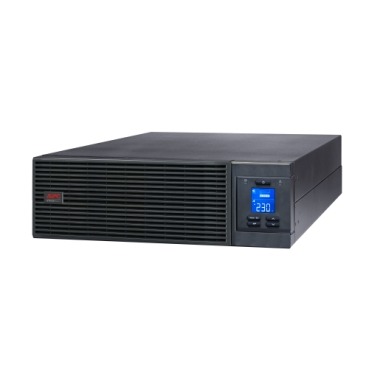
Most Indian buyers research VA capacity, runtime and price before buying an APC Smart-UPS or Easy-UPS online system — but almost nobody asks where it will actually sit until the delivery truck arrives. Correct APC Online UPS placement isn’t a cosmetic afterthought. Double-conversion online UPS units run their internal inverter continuously, which means they generate more heat and fan noise than a line-interactive Back-UPS, and they need breathing room, stable temperature and a solid floor to deliver their rated life. Get the location wrong and you’ll see shortened battery life, nuisance overheat alarms, or a UPS that simply can’t be serviced when it needs a battery swap. This guide walks through exactly what to check before you buy and where the unit will go.

Why Placement Matters More for Online UPS Than for a Back-UPS
A home Back-UPS sits idle in standby most of the time and only switches to battery during a cut, so it barely warms up. An online UPS works differently — it continuously converts incoming AC to DC and back to AC (double conversion), which means its transformer, inverter and cooling fans are always active, even when mains power is perfectly healthy. That constant operation produces steady heat output and audible fan noise 24×7, which is exactly why these units are built for server rooms and dedicated electrical rooms rather than a corner of an open office or a cupboard.
Room Temperature & Ventilation: What to Check Before You Buy
- Ambient temperature: Keep the room between 20°C–25°C for best battery life; every 8–10°C above 25°C can roughly halve battery service life.
- Clearance: Leave at least 150–200mm of free space around the air intake and exhaust vents — never push a tower unit flush against a wall or inside a closed cabinet without ventilation cutouts.
- Airflow direction: Most APC online UPS draw cool air from the front/bottom and exhaust warm air from the rear/top — don’t block this path with cables or shelving.
- Dust & humidity: Server rooms with AC and basic dust control extend both UPS and battery life; avoid kitchens, store-rooms or anywhere with high humidity or grease.
- Fire-rated, lockable room: For 3-phase or rack installations above a few kVA, a dedicated electrical/UPS room with restricted access is standard practice in Indian offices and data closets.
How Much Noise Does an Online UPS Actually Make?
Expect a continuous, low hum from cooling fans — typically in the 45–55 dB(A) range for mid-size online UPS, rising under higher load or on battery. This is fine for a server room or utility area but noticeably more than a silent line-interactive Back-UPS sitting under a desk. If the UPS has to share space with staff workstations, plan for a partition, a UPS room, or at minimum place it away from meeting rooms and reception areas.

Floor Space & Load — Rack-Mount vs Tower
If you’re deploying a rack-mount online UPS inside a 19-inch server rack, confirm the rack’s weight rating before you order — a loaded online UPS with internal batteries can weigh 30–60kg or more, and larger external battery packs (EBMs) add significantly more. For tower-format online UPS on an open floor, check that the floor can bear concentrated point-load weight, especially on raised/false flooring common in server rooms, and that there’s a clear path to roll or carry the unit in — many units arrive on pallets and don’t fit through standard doorways once uncrated.
Online UPS vs Line-Interactive: Placement Needs Compared
| Factor | Online (Double-Conversion) UPS | Line-Interactive Back-UPS/BR |
|---|---|---|
| Heat output | Continuous, moderate-to-high | Low (active only on battery) |
| Noise | Audible fan hum, 24×7 | Near-silent on standby |
| Room requirement | Dedicated/ventilated room recommended | Can sit under a desk or in open office |
| Floor loading | Check rack/floor rating, especially with EBMs | Minimal — lightweight for most VA ranges |
| Best suited for | Servers, racks, critical business loads | PCs, routers, CCTV, home/SOHO use |
If your load is a handful of desktops, routers or printers rather than a server rack, a line-interactive UPS is usually easier to place and run quietly — reserve the online topology for genuinely critical, continuously-loaded equipment.
Planning Battery Space & Replacement Access
Leave enough front or side access to pull out and replace battery trays or RBC cartridges without unracking the whole UPS — many online models are designed for hot-swappable batteries, but only if there’s physical room to slide them out. If you’re sizing spares, keep a look at APC RBC replacement batteries compatible with your model so a future swap doesn’t become a logistics problem.
Buying for an Office or Server Room? Get the Numbers Right First
Before you finalise a room and electrical layout, it helps to have exact dimensions, weight and power input details in writing. If you’re comparing multiple online UPS models or buying for a business/tender, you can use our instant quotation builder to generate a numbered PDF quote with GST and freight in about a minute — useful for checking specs against your room plan before placing an order.
Frequently Asked Questions
Can an online UPS be kept in a normal office cabin?
Small 1–3 kVA units can sit in a cabin if there’s ventilation clearance and the fan noise is acceptable, but anything larger or rack-mounted is better placed in a dedicated UPS/server room.
Does an online UPS need air conditioning in the room?
Not strictly mandatory, but keeping ambient temperature near 25°C significantly improves battery life and reduces thermal stress on electronics — most Indian server rooms already run AC for the IT equipment itself.
How far should the UPS be from the wall?
Follow the manufacturer’s clearance spec, typically 150–200mm minimum around intake and exhaust vents, more for larger 3-phase units with rear-mounted fans.
Is floor loading really a concern for a tower UPS?
Yes, especially on raised/false flooring — a loaded online UPS with batteries can concentrate significant weight on a small footprint, so check the floor or rack rating before installation, not after.
Shop what this guide covers
- APC BR1500G-IN battery replacementThe correct RBC144 cartridge for the BR1500G-IN (1500VA).
- Which APC UPS for Servers & Server Racks?Load table, VA sizing and the genuine APC units we stock for it.
- Genuine APC RBC replacement batteriesFactory-sealed APC Replacement Battery Cartridges with full manufacturer warranty.
- APC Back-UPS — for home & small officeLine-interactive UPS for desktops, Wi-Fi routers, CCTV and billing machines.
What size UPS do I need? »Find the battery for my UPS »Ask us on WhatsApp
Related guides
- Does Your APC Line-R Stabilizer Need Earthing? Installation & Safety Checklist Before You Buy (India 2026)
- Is Your Server Room Ready for an APC Online UPS? A Site-Readiness Checklist (India 2026)
- First-Time UPS Buyer? A Complete Checklist Before You Purchase an APC Back-UPS in India (2026)
- How Long Will Your APC Smart-UPS Online Really Last? Runtime vs Load Guide for Indian Server Rooms (2026)
- APC Back-UPS Model Numbers Decoded: What BX, BV, BR & BVX Codes Mean Before You Buy (India 2026)
All UPS & power-backup guides · APC battery replacement chart · APC UPS dealer in your city