
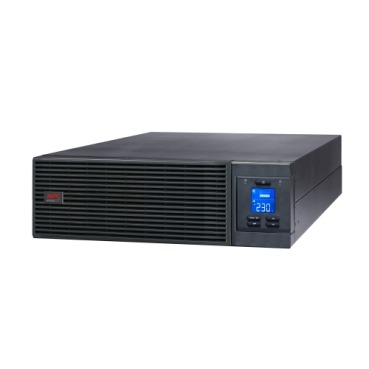
When Indian businesses shop for an online UPS, most of the research goes into VA capacity and runtime — and almost none into form factor. Yet whether you buy a tower-style APC Smart-UPS Online or a rack-mount unit changes how it fits into your server room, how it’s cooled, how cables are managed, and how easily it scales later. Get this wrong and you end up with a UPS that works electrically but is a daily headache to live with. Here’s how to decide between tower and rack-mount before you place the order.

Tower and Rack-Mount Are the Same UPS, Different Shells
Electrically, there’s usually no difference — a 6kVA online double-conversion UPS delivers the same clean, zero-transfer-time power whether it’s a tower sitting on the floor or a 2U/3U chassis bolted into a cabinet. The difference is purely mechanical: how the unit is oriented, mounted, cooled and connected. Many APC Smart-UPS and Easy-UPS Online models are even sold as “convertible” — the same unit can be used as a tower or converted to rack-mount with brackets, which is useful if you’re not 100% sure of your final setup.
Why Form Factor Actually Matters
- Space planning: A rack cabinet has fixed vertical space (measured in U). A 3U rack-mount UPS plus a 3U extended battery module eats into capacity you might want for servers, switches or patch panels.
- Cooling airflow: Rack-mount UPS units are designed for front-to-back or side airflow matching your cabinet’s cooling design. A tower unit placed loose on the floor near a rack can disrupt that airflow pattern if not positioned correctly.
- Cable management: Rack-mount units integrate with your existing cable trays and PDUs inside the cabinet, keeping wiring tidy. Tower units need separate floor-standing cable routing.
- Physical security: A rack-mount UPS locked inside a cabinet is harder to accidentally unplug or tamper with than a tower sitting in an open server room corner.
- Scalability: Rack environments make it easier to add extended battery modules (EBMs) or a second UPS for N+1 redundancy in the same footprint.
When a Tower APC Smart-UPS Online Makes Sense
Choose tower if:
- You don’t have a standard 19-inch server rack at all — common in small offices with just one or two servers on a table or in an open equipment room.
- You’re setting up a small business server room for the first time and don’t want to invest in a full rack cabinet yet.
- The UPS needs to sit in a utility area separate from the IT equipment cabinet.
- Budget favours a simpler standalone unit without rack rail hardware.
When a Rack-Mount APC Smart-UPS Online Makes Sense
Choose rack-mount if:
- You already have (or are building) a 19-inch server rack with switches, servers and patch panels.
- You want a clean, professional data-cabinet look for compliance, audits or client site visits.
- You plan to add extended battery modules or redundant UPS units later within the same rack footprint.
- Multiple IT staff access the room and organised, labelled, rack-mounted equipment reduces mistakes during maintenance.

Tower vs Rack-Mount: Quick Comparison
| Factor | Tower UPS | Rack-Mount UPS |
|---|---|---|
| Best for | No existing rack / small single-server setup | Standard 19-inch rack cabinets |
| Space used | Floor or desk footprint | Fixed rack units (U) inside cabinet |
| Cable management | Separate, floor-level routing | Integrated with rack cable trays |
| Scalability with EBMs | Adjacent floor space needed | Stacks within same rack |
| Typical buyer | Small office, first-time server room | Growing business, data cabinet, co-location |
Sizing Comes Before Form Factor
Whichever shell you choose, the underlying sizing exercise is identical: total up the VA load of your servers, switches, storage and networking gear, add headroom for future growth, and decide on standard or long-runtime battery backup. Browse the full range of APC online UPS systems to compare VA ratings and form factors side by side before finalising a model. If your facility is still on a line-interactive setup and you’re evaluating an upgrade, it’s also worth comparing against line-interactive UPS options to confirm double-conversion online protection is genuinely needed for your load.
Buying for Multiple Racks or Branch Offices
IT managers specifying UPS units across several server rooms or branch locations often need a clear, itemised quotation for internal approval before purchase. Instead of waiting on back-and-forth emails, you can use our instant quotation builder to select tower or rack-mount models, battery add-ons and quantities, and receive a numbered PDF quote with GST and freight included in about a minute — handy when comparing options for a tender or multi-site rollout.
Frequently Asked Questions
Can a tower UPS be converted to rack-mount later?
On many APC Smart-UPS and Easy-UPS Online models, yes — convertible units ship with or support optional rack-mount rail kits, letting you switch orientation if you build a rack cabinet after initial deployment.
Does rack-mount cost more than tower for the same VA rating?
Rack-mount units are sometimes priced slightly higher due to the rail hardware and chassis engineering, but the difference is usually small compared to the convenience gained in an organised server room.
Can I mix a tower UPS with rack-mounted servers?
Yes, this is common in smaller setups — the UPS sits on the floor beside or below the rack while all IT equipment stays rack-mounted. It works fine electrically; just plan cable runs and airflow sensibly.
How many rack units (U) does a typical online UPS occupy?
Depending on VA capacity, rack-mount APC online UPS units typically range from 2U to 6U, with extended battery modules adding further U space — always check the datasheet for exact rack-unit height before planning cabinet layout.
Shop what this guide covers
- APC BR1500G-IN battery replacementThe correct RBC144 cartridge for the BR1500G-IN (1500VA).
- APC Back-UPS — for home & small officeLine-interactive UPS for desktops, Wi-Fi routers, CCTV and billing machines.
- APC Smart-UPS & online UPSDouble-conversion, pure sine-wave power for servers, racks and critical loads.
- All APC UPS systemsThe full genuine APC range, with GST invoice and pan-India delivery.
What size UPS do I need? »Find the battery for my UPS »Ask us on WhatsApp
Related guides
- Standard Runtime vs Long Runtime APC Smart-UPS Online: Which Should You Buy for Your Server Room? (India 2026)
- APC Line-R Stabilizer Form Factors: Wall-Mount, Tabletop or Rack-Mount — Which Should You Buy? (India 2026)
- How Long Will Your APC Smart-UPS Online Really Last? Runtime vs Load Guide for Indian Server Rooms (2026)
- APC Extended Warranty for Back-UPS vs Smart-UPS Online: How Coverage, Price & Service Differ (India 2026)
- Zero Transfer Time: Why It Matters When Buying an APC Online UPS for Your Server (India 2026)
All UPS & power-backup guides · APC battery replacement chart · APC UPS dealer in your city