
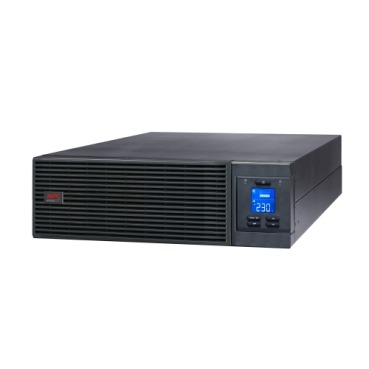
When an IT manager or facility head starts shortlisting an APC Smart-UPS Online for a server room or data centre, one decision gets overlooked until the quotation stage: should the UPS be modular (power modules that slide in and out) or monolithic/standalone (a fixed-capacity unit)? The answer changes your upfront cost, your downtime during servicing, and how easily you can grow capacity later. This guide breaks down the real-world differences for Indian buyers so you don’t end up with the wrong architecture for your load.

What Does “Modular” Actually Mean in an Online UPS?
In a modular APC Smart-UPS, the power electronics (and sometimes the batteries) are built as hot-swappable cards or trays inside a shared chassis. You can add power modules as your load grows, and if one module fails, you pull it out and slot in a spare without shutting the whole UPS down. A monolithic unit, by contrast, is a single sealed box engineered for a fixed kVA rating — if it fails, the entire unit typically needs servicing or replacement.
Key Differences at a Glance
| Factor | Modular UPS | Monolithic (Standalone) UPS |
|---|---|---|
| Initial cost | Higher per kVA at small capacity | Lower per kVA, especially at fixed size |
| Scalability | Add power modules as load grows | Must replace unit to upgrade capacity |
| Serviceability | Hot-swap faulty module, no full shutdown | Full unit often needs technician visit |
| Redundancy (N+1) | Easy — add one extra module | Needs a second parallel unit |
| Footprint | Compact, rack or tower chassis | Can be bulkier for equivalent output |
| Best fit | Growing data centres, colocation, critical server rooms | Fixed-load offices, single server, retail backend |
When a Modular APC Smart-UPS Online Makes Sense
- Your load is expected to grow — a new branch office that will add servers over 2-3 years benefits from buying a modular frame and adding capacity later instead of re-buying a whole UPS.
- You need N+1 redundancy — a spare power module gives you built-in fault tolerance without running two separate UPS units in parallel.
- Uptime is non-negotiable — hospitals, NBFCs, e-commerce warehouses, and co-location racks where even a planned maintenance window is costly.
- You have rack space but not floor space — modular units are usually designed for rack-mount efficiency.
When a Monolithic Unit Is the Smarter Buy
- Your server load is fixed and well-defined (say, one application server and a NAS box) and unlikely to expand.
- Budget is the primary constraint and you want maximum kVA per rupee today.
- You already run a tower-style online UPS for a single rack or server room and don’t anticipate adding more load-bearing equipment.
- You have a single IT admin who prefers a simple “replace the box” service model over module-level troubleshooting.
Sizing: Don’t Choose Architecture Before You Know Your Load
Before deciding modular vs monolithic, calculate your actual critical load in watts (not just VA), add 25-30% headroom for future growth, and check whether you need single-phase or three-phase input based on your total kVA requirement. A server room drawing 3-5 kVA today but expected to double within two years is a textbook modular use case. A single rack with one file server pulling a steady 1.5 kVA rarely justifies the extra modular premium.
Don’t Forget the Battery Runtime Question
Modular or not, your UPS is only as good as its battery backup time. If your server room needs 30-45 minutes of runtime to allow a clean shutdown or generator start, you may need extended battery modules regardless of which topology you pick — factor this into your total cost, not just the UPS sticker price. Also plan ahead for replacement cycles using genuine APC RBC battery packs matched to your specific UPS model.
A Practical Buying Checklist
- Calculate present load in watts and expected load in 2-3 years.
- Decide if N+1 redundancy is a business requirement or a nice-to-have.
- Check available floor/rack space and cooling capacity.
- Confirm single-phase vs three-phase input availability at your site.
- Factor in battery runtime needs and future EBM (extended battery module) costs.
- Get a formal, itemised quotation before committing — for businesses comparing multiple configurations, our instant quotation builder generates a GST-inclusive PDF quote in about a minute, useful when you’re presenting options to management or a tender committee.
Frequently Asked Questions
Is a modular UPS always more reliable than a monolithic one?
Not automatically — reliability depends on build quality and maintenance, not just architecture. What modular design genuinely improves is serviceability: you can replace a faulty module in minutes without powering down connected servers, which a monolithic unit usually can’t match.
Can I add modules to a modular APC UPS later without buying a new chassis?
Yes, that’s the core advantage — as long as your frame has empty module slots, you simply purchase and install additional power modules to raise capacity, rather than replacing the entire unit.
Is modular UPS overkill for a small business with one server?
Generally yes. If your load is small and stable, a standalone online UPS sized correctly for your current and near-future needs is more cost-effective than paying a premium for modularity you may never use.
Does modular design affect maintenance contract pricing?
Often, yes — AMC costs can be slightly higher for modular systems due to module-level diagnostics, but this is usually offset by reduced downtime during servicing. Always ask your vendor to itemise AMC terms for modules versus full-unit replacement.
Shop what this guide covers
- UPS AMC & Preventive MaintenanceScheduled preventive visits, battery health checks and priority response for business-critical power.
- Which APC UPS for Servers & Server Racks?Load table, VA sizing and the genuine APC units we stock for it.
- Genuine APC RBC replacement batteriesFactory-sealed APC Replacement Battery Cartridges with full manufacturer warranty.
- APC Smart-UPS & online UPSDouble-conversion, pure sine-wave power for servers, racks and critical loads.
What size UPS do I need? »Find the battery for my UPS »Ask us on WhatsApp
Related guides
- Tower vs Rack-Mount APC Smart-UPS Online: Which Form Factor Should You Buy for Your Server Room? (India 2026)
- Standard Runtime vs Long Runtime APC Smart-UPS Online: Which Should You Buy for Your Server Room? (India 2026)
- How Long Will Your APC Smart-UPS Online Really Last? Runtime vs Load Guide for Indian Server Rooms (2026)
- Is Every APC Smart-UPS Online Truly Pure Sine Wave? THD Specs Explained Before You Buy (India 2026)
- APC Extended Warranty for Back-UPS vs Smart-UPS Online: How Coverage, Price & Service Differ (India 2026)
All UPS & power-backup guides · APC battery replacement chart · APC UPS dealer in your city