
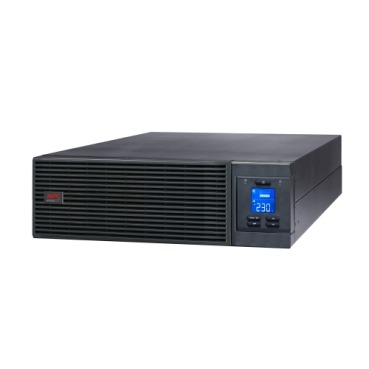
Buying an APC Smart-UPS Online for a server rack is not the same exercise as picking a Back-UPS for a home PC. Get the capacity wrong and you either overpay for a unit twice the size you need, or you buy something that trips on load the day your rack gets busy. This guide walks through APC Smart-UPS Online sizing the way an IT manager or system integrator in India should actually do it — from server wattage to kVA rating, with real numbers you can use before you place an order.

Why Online UPS Sizing for Servers Isn’t the Same as Back-UPS Sizing
A home Back-UPS mostly sits idle and switches on during a power cut, so a little overload for a few minutes is forgivable. A server rack running on an online UPS is drawing power through the UPS continuously, 24×7, including during normal mains supply. That means there’s no margin for guesswork — the UPS has to carry the full connected load, the inrush when servers and storage arrays power up together, and leave headroom for whatever you add next year. This is exactly why Smart-UPS Online sizing starts with real wattage numbers, not a rough VA guess.
APC Smart-UPS Online Sizing: The Basic Formula
Every UPS is rated in VA (volt-amps), but your servers draw actual watts. The relationship depends on power factor (PF):
- Step 1: Add up the rated wattage of every device that will sit on the UPS — servers, switches, SAN/NAS, firewall, rack PDU losses.
- Step 2: Convert to VA using VA = Watts ÷ Power Factor. Most APC Smart-UPS Online units have an output PF of 0.9, so Watts ÷ 0.9 gives you the VA demand.
- Step 3: Add 20-30% headroom for future growth and inrush current at startup.
- Step 4: Round up to the nearest standard APC Smart-UPS Online kVA rating (1, 2, 3, 5, 6, 10, 15, 20 kVA and above).
Typical Server Loads and Recommended APC Smart-UPS Online Capacity
Use this as a starting reference — always verify with your actual server nameplate wattage or a watt-meter reading, since a 1U server can draw anywhere from 150W to 500W depending on CPU count, drives and GPUs.
| Setup | Approx. Load | Recommended APC Smart-UPS Online Capacity |
|---|---|---|
| 1-2 standalone servers + switch | 400-700W | 1-2 kVA |
| Small server rack (3-5 servers, NAS, firewall) | 1.2-2 kW | 3 kVA |
| Mid-size rack (5-10 servers, SAN) | 2.5-4.5 kW | 5-6 kVA |
| Dense virtualization host rack (10-20 servers) | 5-9 kW | 10 kVA |
| Full data-center rack or multiple racks | 10kW+ | 15-20 kVA or parallel units |
Growth Headroom, N+1 and Why 100% Load Is a Bad Idea
Running an online UPS consistently above 80% load leaves no room for a bad battery cell, an extra server, or a surge when everything reboots after a outage. Most Indian IT teams size for 60-70% load at day one, which also keeps the UPS running cooler and extends battery life. If uptime is business-critical — billing systems, hospital records, trading desks — consider two smaller units in parallel instead of one large box, so a single UPS failure doesn’t take the whole rack down. You can browse current capacities and configurations in our APC online UPS range to compare kVA options before finalising a model.
Battery Runtime: Sizing for Safe Shutdown, Not All-Night Backup
Unlike a home inverter, most server-room online UPS units are sized for 10-20 minutes of standard runtime — just enough to ride out short outages or trigger an automated graceful shutdown before the diesel generator kicks in or disks are safely parked. Don’t oversize the kVA just to get longer battery life; instead, add an External Battery Module (EBM) if you genuinely need 30-60+ minutes. When the internal batteries eventually age out, replacing them correctly matters as much as the initial sizing — our guide to matching APC RBC replacement batteries to your exact UPS model is worth bookmarking for when that day comes.
Bulk or Tender Purchases for Multiple Racks
If you’re sizing UPS capacity across several racks, branch offices or a new server room build-out, getting individual quotes for each unit becomes tedious and inconsistent. For bulk or tender-style purchases, our instant quotation builder lets you select multiple APC Smart-UPS Online models and quantities and generates a numbered PDF with GST and freight in about a minute — no back-and-forth with a salesperson needed, which is useful when you’re comparing options across a procurement committee.
Frequently Asked Questions
How many watts does a typical rack server actually consume?
A basic 1U server idles around 150-250W and can peak at 400-500W under load with multiple drives or GPUs installed. Always check the server’s power supply unit (PSU) rating and, where possible, measure real draw with a watt-meter rather than relying on the PSU’s maximum rating alone.
Should I size the UPS to the PSU rating or the actual measured load?
Measured load is far more accurate. PSU ratings reflect maximum theoretical draw, which is rarely reached in practice. Sizing on PSU ratings alone often leads to a UPS two or three sizes larger — and more expensive — than you actually need.
Is it safe to just buy a much bigger APC Smart-UPS Online than I calculate, to be safe?
Oversizing isn’t dangerous, but it wastes capital and runs the UPS at a low load percentage, which is slightly less power-efficient. A 20-30% buffer over your calculated load is sensible; doubling your requirement
Shop what this guide covers
- Which APC UPS for Servers & Server Racks?Load table, VA sizing and the genuine APC units we stock for it.
- Genuine APC RBC replacement batteriesFactory-sealed APC Replacement Battery Cartridges with full manufacturer warranty.
- APC Back-UPS — for home & small officeLine-interactive UPS for desktops, Wi-Fi routers, CCTV and billing machines.
- APC Smart-UPS & online UPSDouble-conversion, pure sine-wave power for servers, racks and critical loads.
What size UPS do I need? »Find the battery for my UPS »Ask us on WhatsApp
Related guides
- How Long Will Your APC Smart-UPS Online Really Last? Runtime vs Load Guide for Indian Server Rooms (2026)
- Modular vs Monolithic APC Smart-UPS Online: Which Should You Buy for Your Server Room in India? (2026)
- Tower vs Rack-Mount APC Smart-UPS Online: Which Form Factor Should You Buy for Your Server Room? (India 2026)
- Standard Runtime vs Long Runtime APC Smart-UPS Online: Which Should You Buy for Your Server Room? (India 2026)
- Is Every APC Smart-UPS Online Truly Pure Sine Wave? THD Specs Explained Before You Buy (India 2026)
All UPS & power-backup guides · APC battery replacement chart · APC UPS dealer in your city