

Standing in front of four APC Back-UPS models — the BX600, BX1000/BX1100 and the BR1000/BR1500 — and not sure which one your home or small office actually needs? You’re not alone. Most Indian buyers either over-spend on a bigger UPS than they’ll ever use, or under-size and end up with a UPS that shuts down mid-load. This guide breaks down each APC Back-UPS class by the real-world loads it can handle, the runtime you can expect during an Indian power cut, and which one suits a desktop, a Wi-Fi router or a CCTV setup.

First: VA is not watts
Every APC Back-UPS is rated in VA (volt-amperes) and watts. The VA number is the headline (600VA, 1100VA, 1500VA), but watts is what actually powers your equipment. For APC Back-UPS models the watt rating is roughly 50–60% of the VA figure. So a 1100VA unit gives about 660W, and a 1500VA unit gives about 865W. Always add up the wattage of your gear and match it to the watts rating, not the VA.
A quick tip for Indian buyers: never load a Back-UPS beyond ~70% of its watt rating if you want meaningful runtime and long battery life. Running near 100% load in our hot climate cooks the internal battery fast.
Model-by-model breakdown
| Model | Approx. Watts | Waveform | Best for | Typical runtime |
|---|---|---|---|---|
| BX600 | ~360W | Stepped/simulated | Wi-Fi router + modem, small CCTV NVR | 15–60 min on light loads |
| BX1000 / BX1100 | ~600–660W | Stepped/simulated | Home desktop + monitor, work-from-home | 8–20 min on a typical PC |
| BR1000G (Pro) | ~600W | Pure sine wave | Sensitive desktops, active-PFC power supplies | 10–20 min |
| BR1500G (Pro) | ~865W | Pure sine wave | Gaming PC, workstation, multi-device setup | 10–25 min |
Choosing for a desktop PC
A typical Indian home desktop (mid-range CPU, one monitor, no gaming GPU) draws around 150–250W. For this, a BX1000 or BX1100 is the sweet spot — enough headroom to keep running and give you 10–15 minutes to save work and shut down safely.
If your PC has a modern power supply with active PFC (most gaming rigs and newer builds), a stepped-sine BX unit can cause the PSU to switch loudly or shut off when it transfers to battery. In that case step up to a pure sine wave BR1000G. Explore the full range in our line-interactive Back-UPS collection to compare specs side by side.
Choosing for a Wi-Fi router, modem or ONT
Routers and fibre ONTs are tiny loads — usually 10–25W combined. A BX600 is more than enough and, because the load is so light, you’ll often get 45–90 minutes of internet uptime during a cut. This is the single most cost-effective backup upgrade for any Indian home that works or studies online.
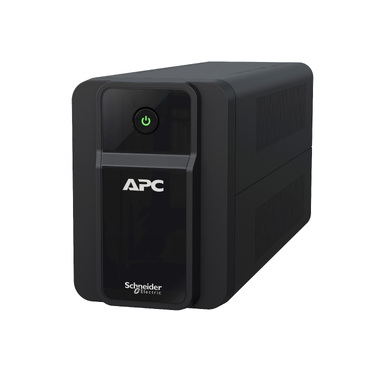
Choosing for a CCTV system
CCTV loads depend on your setup. A 4-channel DVR/NVR with a couple of cameras and a small monitor typically draws 30–60W. A BX600 handles this comfortably and gives long runtime. For an 8-channel NVR with PoE cameras and a larger monitor (100–150W), move up to a BX1000/BX1100. Remember PoE cameras drawing power through the NVR count toward your total load.
A simple 4-step sizing method
- List your devices and note each one’s wattage (check the label or adapter; PCs use the PSU rating × ~0.5 as a rough draw).
- Add them up to get total watts.
- Add 25% headroom for surge and future devices.
- Pick a model whose watt rating is at least this number — and confirm it’s within 70% of that model’s max watts for good runtime.
Waveform: when to pay extra for pure sine wave
The BX series uses a stepped/simulated sine wave and is perfectly fine for routers, CCTV and older/basic PCs. The BR (Back-UPS Pro) series delivers a clean pure sine wave, which matters for equipment with active-PFC power supplies, medical devices, or anything that hums, clicks or reboots on a stepped wave. If your gear is sensitive or expensive, the extra ₹ for a BR model is cheap insurance.
Frequently asked questions
Can one APC Back-UPS power my desktop, router and CCTV together?
Yes, if the combined wattage fits within one model’s rating. A desktop (200W) + router (20W) + a small NVR (40W) totals ~260W, comfortably handled by a BX1000/BX1100 with about 10–15 minutes of full-load runtime. Just don’t add a laser printer or anything with a heating element.
Why does APC list VA higher than watts?
VA measures apparent power and watts measure real power consumed; the ratio is the power factor. APC Back-UPS units are built with a power factor around 0.5–0.6, so watts are always well below VA. Always size by watts to avoid a nasty surprise.
Will a bigger VA UPS give longer backup?
Usually yes, because a larger unit has a bigger internal battery — but only if your load is light relative to its capacity. Running a big UPS at near-full load can actually give less runtime than a smaller one running lightly. Backup time comes from battery capacity and load, not VA alone.
How long will these batteries last in India?
Internal Back-UPS batteries typically last 3–5 years, less in hot, un-ventilated rooms. When runtime drops sharply, you replace the battery — not the whole UPS. See our genuine APC RBC replacement batteries for the correct cartridge for your model.
Bottom line
For a router-only backup, buy a BX600. For a home desktop or work-from-home setup, a BX1000/BX1100 is the go-to. For gaming rigs, workstations or sensitive PSUs, choose a pure sine wave BR1000G or BR1500G. Match watts (not VA), keep loads under 70%, and you’ll get years of reliable backup. Browse the full APC UPS range to confirm the exact model for your load.
Shop what this guide covers
- Genuine APC RBC replacement batteriesFactory-sealed APC Replacement Battery Cartridges with full manufacturer warranty.
- APC Back-UPS — for home & small officeLine-interactive UPS for desktops, Wi-Fi routers, CCTV and billing machines.
- All APC UPS systemsThe full genuine APC range, with GST invoice and pan-India delivery.
What size UPS do I need? »Find the battery for my UPS »Ask us on WhatsApp
Related guides
- APC Back-UPS Model Numbers Decoded: What BX, BV, BR & BVX Codes Mean Before You Buy (India 2026)
- Ideal Load Percentage for Your APC Back-UPS: How Much Headroom Should You Buy in 2026? (India Guide)
- How Long Can an APC Back-UPS Power Your Wi-Fi Router & CCTV During a Long Power Cut? (India 2026 Sizing Guide)
- How Long Will Your APC Smart-UPS Online Really Last? Runtime vs Load Guide for Indian Server Rooms (2026)
- APC RBC Battery Terminal Types Explained: F1 vs F2 vs Bolt-On — Which Fits Your UPS? (India 2026)
All UPS & power-backup guides · APC battery replacement chart · APC UPS dealer in your city