

When you buy an APC Back-UPS, the question that trips up most Indian buyers isn’t the VA rating — it’s the outlets. A Back-UPS 600 or 1100 has a fixed number of sockets, and not all of them are battery-backed. Overload the unit and it beeps and shuts off during a power cut, right when you need it. This guide explains how to plan which devices go on which outlets, how many things one Back-UPS can realistically run, and which model to pick based on your device list rather than guesswork.

Battery-Backed vs Surge-Only Outlets
This is the single most misunderstood thing about a Back-UPS. On most APC Back-UPS models, some outlets are battery + surge protected (they keep running during a power cut) and the rest are surge-only (they protect against spikes but go dead when mains fails). The battery-backed sockets are usually marked with a battery icon.
- Plug your critical loads — desktop CPU, monitor, router, ONT/modem, CCTV NVR — into the battery-backed outlets.
- Plug non-critical loads — printer, phone charger, table lamp, speakers — into surge-only outlets, or leave them out entirely.
- Never plug a laser printer or anything with a heating element into a battery-backed outlet — the startup surge can trip the UPS.
On smaller units like the Back-UPS 600, several outlets share the same battery, so the socket count is less important than the total watts you connect.
Watts Matter More Than Socket Count
You could have six free sockets but still overload the UPS if the connected watts exceed its rating. A Back-UPS delivers roughly 55–60% of its VA number in real watts. So a Back-UPS 1100 (~660W usable) can comfortably run this typical home-office cluster:
| Device | Typical Draw | Battery-backed? |
|---|---|---|
| Desktop CPU (mid-range) | 120–180W | Yes |
| Monitor (24″, LED) | 25–35W | Yes |
| Wi-Fi router + ONT | 15–25W | Yes |
| 4-channel CCTV DVR/NVR + cameras | 40–60W | Yes |
| Laser printer | 300–900W (spikes) | No — surge only |
Add up only the devices you actually want to keep alive during a cut. If the total watts stay under about 60% of the VA rating, you’ll get sensible runtime and the UPS won’t overload.
Matching Device Count to the Right Model
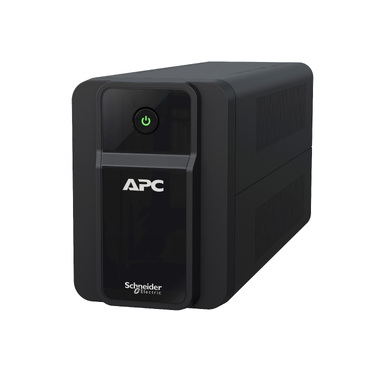
Here’s a practical starting point based on how many devices and how much load you plan to run. You’ll find all of these in our line-interactive Back-UPS range.
- Router + modem + one CCTV setup only — Back-UPS 600VA (BX600). Low-watt loads, long runtime, ideal as a dedicated networking UPS.
- Single desktop + monitor + router — Back-UPS 1000 or 1100VA (BX1000/BX1100). Comfortable headroom for a work-from-home PC plus networking.
- Desktop + monitor + router + CCTV together — Back-UPS 1100VA minimum, ideally with a look at runtime, since you’re now running four device groups.
- Gaming PC / workstation with power-hungry GPU — Back-UPS Pro 1500VA (BR1500), which also gives pure sine wave output for sensitive PSUs.
Don’t Daisy-Chain Extension Boards
A very common Indian mistake: plugging a 6-way spike guard into one UPS socket and then loading five devices onto it. Two problems arise:
- You bypass the outlet plan. Everything on that board rides the same UPS outlet — you lose control over what’s battery-backed.
- You hide the real load. It’s easy to quietly exceed the watt limit, causing overload beeps and shutdowns during a power cut.
If you genuinely need more battery-backed sockets, buy a higher-VA model rather than chaining boards. It’s safer and keeps runtime predictable.
Plan for Runtime, Not Just Fit
Fitting devices into the outlets is only half the job. The more you load a Back-UPS, the shorter it runs on battery. A 1100VA running just a router might last hours, but the same unit running a full desktop + CCTV setup may give only 15–25 minutes. If your area sees long cuts, either size up or reserve battery outlets for only the essentials. When runtime eventually drops even under light load, it’s usually the battery ageing — a genuine APC RBC replacement cartridge restores it without replacing the whole UPS.
Frequently Asked Questions
Can I plug my AC or fridge into a Back-UPS?
No. Back-UPS models are designed for electronics — computers, routers, CCTV. High-inrush appliances like ACs, fridges and geysers need an inverter or a suitably rated system, not a Back-UPS. Doing so will overload and damage the unit.
How do I know which outlets are battery-backed?
Check the socket labels on the rear of the UPS — battery-backed outlets carry a small battery symbol, while surge-only ones are marked accordingly. The user manual for your model also has a diagram. On very small units all outlets may be battery-backed.
Is it bad to leave empty sockets unused?
Not at all. Leaving surge-only sockets empty is perfectly fine and often smart — it stops you from casually overloading the unit. The number of used sockets doesn’t affect battery life; only the connected watts do.
Should I get one bigger UPS or two smaller ones?
For a home with a PC in one room and CCTV in another, two smaller units placed near each load often work better than one large UPS with long extension runs. For a single desk cluster, one right-sized model is simpler. See our full APC UPS range to compare options.
Bottom line: plan by watts and by which outlets are battery-backed — not by how many free sockets you see. List your must-run devices, add up their watts, keep the total under ~60% of the VA rating, and pick the Back-UPS that fits with headroom to spare.
Shop what this guide covers
- Genuine APC RBC replacement batteriesFactory-sealed APC Replacement Battery Cartridges with full manufacturer warranty.
- APC Back-UPS — for home & small officeLine-interactive UPS for desktops, Wi-Fi routers, CCTV and billing machines.
- All APC UPS systemsThe full genuine APC range, with GST invoice and pan-India delivery.
What size UPS do I need? »Find the battery for my UPS »Ask us on WhatsApp
Related guides
- How Many Appliances Can You Plug Into One APC Line-R Stabilizer? Outlet & Load Planning Guide (India 2026)
- APC Back-UPS vs APC Easy-UPS BVX: Should You Buy a Lithium-Ion UPS for Home or Office in India? (2026)
- APC Back-UPS Model Numbers Decoded: What BX, BV, BR & BVX Codes Mean Before You Buy (India 2026)
- Ideal Load Percentage for Your APC Back-UPS: How Much Headroom Should You Buy in 2026? (India Guide)
- Hardwired or Plug-In? APC Smart-UPS Input/Output Connections Explained Before You Buy (India 2026)
All UPS & power-backup guides · APC battery replacement chart · APC UPS dealer in your city