
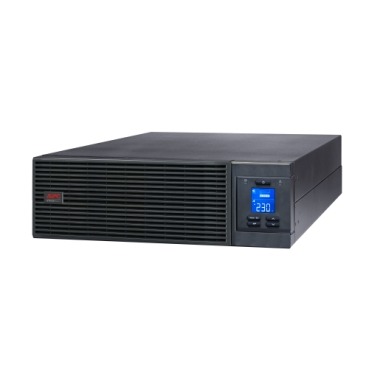
Once you’ve decided that a double-conversion online UPS is what your servers need, the next practical question is rarely about VA or kVA — it’s about shape. Should you buy a rack-mount APC Smart-UPS that slides into your 19-inch rack alongside your switches and servers, or a tower unit that sits on the floor or a table? The answer changes your cabling, cooling, future scalability and even how easily your IT team can service the unit at 2 AM during a breakdown. This guide walks through the real-world trade-offs Indian businesses face when choosing between the two.

What “Rack-Mount” and “Tower” Actually Mean
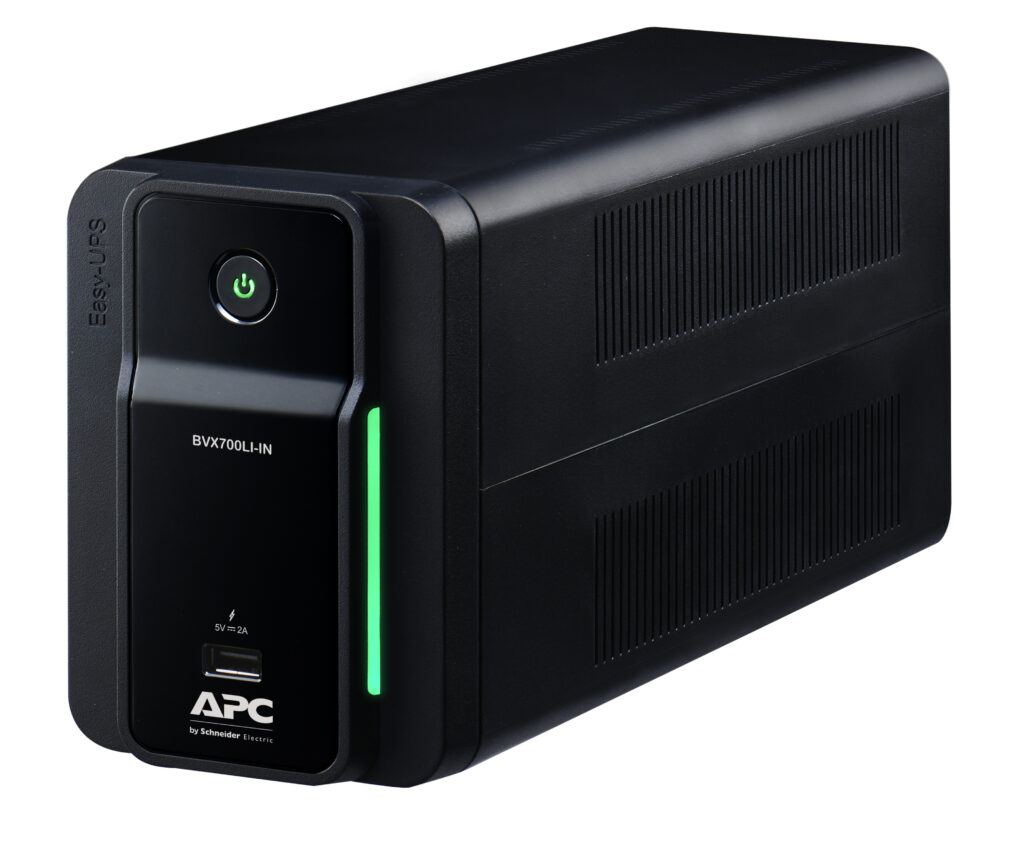
A rack-mount UPS is built to bolt into a standard 19-inch server rack, measured in rack units (U) — typically 2U to 6U depending on capacity. A tower UPS is a free-standing cabinet, usually taller and deeper, meant to sit next to or under a desk, in a small server room corner, or in a retail back-office. Several APC online UPS models (including many in the Easy-UPS SRV and Smart-UPS SRT range) are sold as rack/tower convertible — the same unit, with rail kits included, that you can deploy either way.
Rack-Mount: Best When You Already Have a Rack
- Space efficiency — if you have a server rack with switches, patch panels and a NAS, mounting the UPS in the same enclosure saves floor space and keeps cabling tidy and short.
- Organised power distribution — rack UPS units usually pair with rack-mount PDUs, so every device gets a clean, labelled power path.
- Scales with your rack — as you add servers, you can add matching external battery packs (also rack-mount) in the same enclosure without redesigning the room.
- Airflow discipline — a properly ventilated server rack with front-to-back airflow keeps a rack UPS cooler than an open room corner, which matters in Indian ambient temperatures.
The catch: rack-mount units need adequate rack depth and load-bearing rails, and heavier models (5kVA+) can be awkward for one person to lift into a rack. If your rack is already tightly packed, you may not have the U-space free.
Tower: Best for Smaller Setups Without a Full Rack
- Ideal for a single server, a small NAS, and networking gear sitting on a table or a simple stand rather than a proper rack cabinet.
- Easier to relocate — you can move a tower UPS to a different room without touching rack infrastructure.
- Simpler for businesses just starting out who plan to add a rack later; many tower units can later be converted using the rail kit if the model supports it.
- Generally easier for non-IT staff to visually check status (LCD, load meter) at eye level compared to a rack unit buried mid-cabinet.
Side-by-Side Comparison
| Factor | Rack-Mount | Tower |
|---|---|---|
| Best fit | Existing server rack with switches/servers | Single server or small office setup without a rack |
| Floor space | None extra — uses rack U-space | Needs its own floor/table footprint |
| Cooling | Benefits from rack airflow design | Depends on room ventilation |
| Scalability | Add rack-mount battery packs in same enclosure | May need conversion kit to go rack later |
| Serviceability | Requires rail removal, can be heavy to slide out | Easier physical access for battery swap |
| Typical buyer | Data closets, colocation racks, growing IT setups | Small offices, retail back-office, single-server rooms |
Sizing Doesn’t Change With Form Factor — But Layout Does
Whichever shape you pick, the VA/kVA sizing math is identical: add up the real wattage of your servers, switches, NAS and monitors, apply the UPS’s power factor, and leave 20-30% headroom for growth. What changes is how you plan the room. A rack-mount UPS lets you keep the entire critical load — UPS, PDU, servers, network — inside one cabinet with a single earthing point, which many Indian IT auditors prefer for compliance and cable management. A tower unit is perfectly fine for a smaller load but means you’re running separate power cables to a UPS sitting outside the rack.
Practical Buying Checklist
- Measure your rack’s free U-space and depth before shortlisting a rack-mount model.
- Check if the model you want is available as rack/tower convertible — this future-proofs your decision.
- Confirm your electrical point can handle the UPS’s input current, especially for 3kVA+ online units.
- Plan battery pack expansion slots now if you expect load growth within 2-3 years.
- Browse APC’s online UPS range to compare rack and tower variants side by side before finalising capacity.
FAQs
Can I convert a tower UPS to rack-mount later?
Only if the specific model is designed as rack/tower convertible and includes (or supports buying separately) the rail kit. Not all tower-only models can be converted, so check the datasheet before assuming this flexibility.
Does rack-mounting affect battery runtime?
No. Runtime depends on battery capacity and load, not the cabinet shape. However, poor rack airflow can shorten battery life over time due to heat, so ensure proper ventilation regardless of form factor.
Is a rack-mount UPS more expensive than an equivalent tower model?
Pricing is usually similar for the same VA/kVA capacity; the real cost difference comes from rail kits, rack-mount PDUs, and any additional battery packs you add inside the enclosure.
Should a small office with just one server buy rack or tower?
If you don’t already own a server rack, a tower unit is simpler and cheaper to deploy. Once you add more networking gear or a second server, consider moving to a rack-mount setup or a convertible model.
Whichever form factor you choose, keep future load growth and rack space in mind — and remember to plan for genuine replacement battery cartridges and warranty coverage so your server room stays protected well beyond the first few years.
Shop what this guide covers
- Genuine APC RBC replacement batteriesFactory-sealed APC Replacement Battery Cartridges with full manufacturer warranty.
- APC Smart-UPS & online UPSDouble-conversion, pure sine-wave power for servers, racks and critical loads.
What size UPS do I need? »Find the battery for my UPS »Ask us on WhatsApp
Related guides
- How Long Will Your APC Smart-UPS Online Really Last? Runtime vs Load Guide for Indian Server Rooms (2026)
- Is Your Server Room Ready for an APC Online UPS? A Site-Readiness Checklist (India 2026)
- Does Your APC Online UPS Need a Maintenance Bypass Switch? A Server Room Buying Guide (India 2026)
- Do You Need a Network Management Card for Your APC Smart-UPS? Remote Monitoring Guide for Indian Server Rooms (2026)
- APC Smart-UPS Online Running Costs in India: Double-Conversion Efficiency, ECO Mode & Electricity Bills Explained (2026)
All UPS & power-backup guides · APC battery replacement chart · APC UPS dealer in your city