
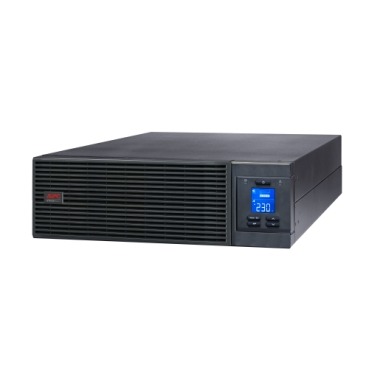
Servers, NAS boxes and network racks rarely fail because of bad hardware — they fail because of dirty Indian power. Sudden cuts, voltage sags during peak load hours, and the surges that follow a power restoration can corrupt RAID arrays, crash databases and shorten the life of drives. A correctly chosen UPS does far more than buy you a few minutes of runtime; it conditions power, rides through brownouts and triggers a clean automatic shutdown before the battery dies. This guide explains how to pick, size and configure an APC UPS for servers and NAS systems in India.

Line-Interactive vs Online (Double-Conversion): What Servers Need
This is the single most important decision for a server UPS. The two topologies behave very differently when the grid misbehaves.
- Line-interactive UPS: Runs your load off mains, regulates voltage using an AVR transformer, and switches to battery in 4–8 milliseconds during an outage. Excellent for home offices, small NAS units and single tower servers. Lower cost and very efficient.
- Online / double-conversion UPS: Continuously rebuilds the AC waveform from DC, so the load never sees raw mains. Zero transfer time, perfect pure sine output, and full protection against frequency variation — important if you also run on a generator. This is the standard for rack servers, virtualization hosts, multi-bay NAS and any 24×7 critical load.
If your data is mission-critical or you have a generator changeover, choose online. A single home NAS or a quiet file server can run safely on a good line-interactive model.
Sizing the UPS: VA, Watts and Power Factor
Server power supplies have a power factor close to 1.0, so you must size by real watts, not just VA. Add up the wattage of every device on the UPS, then apply a safety margin.
- List your load. Note the wattage of the server, each NAS, the switch, router and rack monitor. A typical home NAS with 4 drives draws 40–80W; a small rack server 200–400W.
- Sum the watts. Add 25–30% headroom for spin-up surges and future expansion.
- Match to the UPS watt rating. Never load a UPS beyond 70–80% of its real-power rating; this keeps the battery cool and extends backup time.
- Decide runtime. Servers don’t need hours — they need enough time (typically 5–15 minutes) for the OS to shut down cleanly.
| Setup | Approx. Load | Suggested APC Class | Topology |
|---|---|---|---|
| Single home NAS + router | 80–150W | 600–1100VA Back-UPS | Line-interactive |
| NAS + tower server + switch | 250–500W | 1000–1500VA Back-UPS Pro / Smart-UPS | Line-interactive / Online |
| Small rack (server + storage + network) | 600–1500W | Smart-UPS / Easy-UPS Online 1–3kVA | Online |
| Multi-server rack, 24×7 | 2000W+ | Easy-UPS Online SRV 3–10kVA | Online |

Why Pure Sine Wave Is Non-Negotiable for Servers
Modern server and NAS power supplies use active power factor correction (active PFC). On a stepped/simulated sine wave UPS, these PSUs can misbehave — drawing odd current, beeping, or shutting down the moment the UPS switches to battery. Always use a pure sine wave UPS for IT loads. Among APC’s line-interactive range, the Back-UPS Pro BR1000G-IN provides clean sine output for a single server or high-end NAS, while online models like the APC Smart-UPS 1kVA Online guarantee perfect sine all the time.
Automatic Safe Shutdown: The Feature People Forget
Runtime alone is useless if no one is around at 3 AM during an outage. APC UPS units include a data/USB port and free PowerChute software that handles graceful shutdown automatically.
- PowerChute Serial Shutdown / Personal Edition: Connect the UPS to your server via USB. When the battery drops below a set threshold, it triggers an orderly OS shutdown.
- NAS native support: Synology, QNAP and TrueNAS detect APC UPS units over USB out of the box. Plug in the USB cable and enable “UPS” in settings — the NAS will safe-shutdown on low battery and can even act as a network UPS master for other devices.
- Network management card: For racks, a network card lets the UPS shut down multiple servers and VMs over the LAN and gives you SNMP monitoring.
Rack vs Tower: Practical Indian Considerations
If you have a proper rack, choose a rack-mount or convertible online UPS so it fits the 19-inch frame. For a tower server in a small office or under a desk, a standalone Back-UPS Pro or Smart-UPS tower is simpler. Keep these India-specific points in mind:
- Ventilation: Indian summers are brutal. Batteries lose life fast above 30°C. Keep the UPS in a cool, ventilated spot — ideally the same AC-conditioned room as the server.
- Wide input voltage window: Look for models that tolerate 140–300V so the UPS doesn’t keep flipping to battery during normal voltage swings, which wears the battery.
- Generator compatibility: If you switch to a DG set, an online UPS handles the frequency wobble during changeover far better than line-interactive units.
Maintenance: Keep Your Server UPS Reliable
A UPS protecting a server is itself a single point of failure if neglected. Build a simple routine:
- Run a self-test / runtime calibration every 3–6 months to verify true backup time.
- Replace the battery (RBC cartridge) every 3–5 years, or sooner if runtime drops sharply.
- Keep firmware and PowerChute updated.
- Don’t overload — review the load whenever you add drives or a new server.
Quick Buying Summary
For a home lab or single NAS, a pure sine wave line-interactive UPS in the 600–1100VA range is enough — and you can browse options in our full UPS catalogue. For business-critical servers, virtualization or a 24×7 rack, invest in an online double-conversion UPS sized to about 70% of capacity, paired with PowerChute or native NAS shutdown. Done right, your UPS becomes invisible infrastructure that quietly prevents the data loss and downtime that Indian power instability would otherwise cause.
Shop what this guide covers
- APC BR1000G-IN battery replacementThe correct RBC144 cartridge for the BR1000G-IN (1000VA).
- Which APC UPS for Servers & Server Racks?Load table, VA sizing and the genuine APC units we stock for it.
- Genuine APC RBC replacement batteriesFactory-sealed APC Replacement Battery Cartridges with full manufacturer warranty.
- APC Back-UPS — for home & small officeLine-interactive UPS for desktops, Wi-Fi routers, CCTV and billing machines.
What size UPS do I need? »Find the battery for my UPS »Ask us on WhatsApp
Related guides
- How Long Can an APC Back-UPS Power Your Wi-Fi Router & CCTV During a Long Power Cut? (India 2026 Sizing Guide)
- Sizing an APC Line-R Stabilizer for Refrigerators, ACs & Pumps: Why Starting Surge Matters More Than Running Watts (India 2026)
- APC AMC Response-Time SLAs Explained: 4-Hour vs 8-Hour vs Next-Business-Day (India 2026)
- AVR in Your APC Back-UPS vs a Separate APC Line-R Stabilizer: Do You Need Both? (India 2026 Guide)
- Zero Transfer Time: Why It Matters When Buying an APC Online UPS for Your Server (India 2026)
All UPS & power-backup guides · APC battery replacement chart · APC UPS dealer in your city