
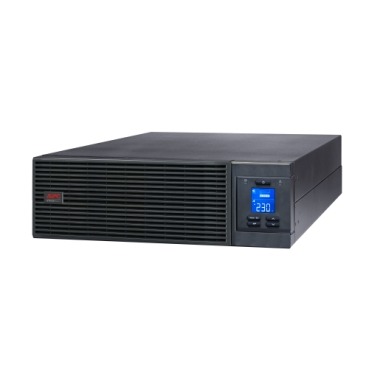
You picked a 3kVA APC Smart-UPS for a server rack drawing what you thought was 2,400W of load. But when you plugged everything in, the UPS overloaded — or it ran for half the runtime you expected. What went wrong? The answer is almost always power factor — the single most misunderstood number in UPS sizing. In India, where buyers often size purely on VA rating, this mistake leads to overloaded units, tripped output breakers and disappointing backup times. This guide explains VA vs Watts vs power factor in plain terms, and shows you how to size an APC Smart-UPS or Easy-UPS Online correctly for real server and business loads.

VA vs Watts: What the Numbers Actually Mean
VA (Volt-Amps) is the apparent power — the total current the UPS can supply. Watts (W) is the real power — the actual energy your equipment consumes. The relationship is:
Watts = VA × Power Factor
Power factor (PF) is a number between 0 and 1 that describes how efficiently equipment uses current. A perfect resistive load (like a heater) has PF = 1. Switching power supplies in servers, network switches and desktops draw current in a way that gives them a PF typically between 0.6 and 0.95.
The APC Rating Trap Most Indian Buyers Fall Into
Older APC Smart-UPS models were rated at PF 0.6–0.7, meaning a “1000VA” unit only delivered ~600–700W. Newer Smart-UPS and Easy-UPS Online (SRV/SRT) models are rated at 0.9 or unity (1.0) power factor, so a 3kVA unit delivers 2,700W–3,000W. If you compare an old spec sheet to a new one, the watt capacity can differ by 40% for the same VA number. Always check BOTH ratings before buying from the online UPS range.
| APC Model (example) | VA Rating | Watt Rating | Power Factor |
|---|---|---|---|
| Smart-UPS 1500VA (older SMT) | 1500 VA | 1000 W | 0.67 |
| Smart-UPS SRT 3000VA | 3000 VA | 2700 W | 0.90 |
| Easy-UPS SRV 3000VA | 3000 VA | 2400 W | 0.80 |
| Easy-UPS Online SRV 10kVA | 10000 VA | 10000 W | 1.0 (unity) |
How to Size Correctly: A Step-by-Step Method
- List every device that will connect to the UPS — servers, switches, storage/NAS, firewall, KVM, monitor.
- Find each device’s Watt draw. Use the nameplate or, better, a plug-in energy meter to measure actual consumption. Nameplate figures are usually maximum ratings and overstate real load by 30–50%.
- Add up total Watts and total VA separately. If you only have VA figures, divide by an assumed PF of 0.8 to estimate Watts.
- Apply a headroom buffer. Never load a UPS beyond 70–80% of its rated capacity. This protects against inrush currents and leaves room for growth.
- Check BOTH ratings. Your total load must be below the UPS’s VA rating AND its Watt rating. Whichever limit you hit first is your ceiling.
A Real Indian Server-Room Example
Say your rack has: 2 rack servers (400W each = 800W), a network switch (150W), a NAS (120W), and a firewall (60W). Total = 1,130W. Adding 30% headroom gives ~1,470W. A Smart-UPS SRT 3000VA (2,700W) is comfortable, while a 2kVA unit rated at 1,600W would be running too hot. Notice how a naive VA-only calculation might have pushed you toward a needlessly large — or dangerously small — unit.
Why This Matters More for Online UPS
Double-conversion online UPS units (like the SRT/SRV series) run your load continuously through the inverter, so an undersized unit runs hot 24×7, not just during power cuts. Overloading shortens battery and capacitor life and can trip the output breaker without warning. If you’re deciding between topologies, our comparison of line-interactive UPS models versus online units can help — but whichever you choose, correct wattage sizing is non-negotiable.
Pure Sine Wave Still Matters — But It’s Separate
Don’t confuse power factor with waveform. Both Smart-UPS and Easy-UPS Online output pure sine wave power, which is essential for active-PFC server power supplies. A stepped/simulated sine wave can cause these supplies to shut down or overheat. Pure sine is about waveform quality; power factor is about capacity. You need both correct for a reliable server-room deployment.
Frequently Asked Questions
Is a higher power factor UPS always better?
For modern server loads, yes — a unity or 0.9 PF unit delivers more usable Watts per VA, giving you better value. Older 0.6 PF units waste a large chunk of their VA rating, so avoid them for wattage-heavy racks.
Should I use nameplate ratings or measured power?
Always prefer measured power using a plug-in energy meter. Nameplate figures are maximum ratings and typically overstate real consumption by 30–50%, leading you to buy a UPS that’s far larger and more expensive than needed.
How much headroom should I leave on an online UPS?
Target 70–80% of rated capacity at most. This protects against startup inrush, allows for future expansion, and keeps the inverter running cooler — which directly extends battery and capacitor life in Indian ambient temperatures.
Does derating apply to battery runtime too?
Yes. A UPS loaded near its Watt limit drains batteries fastest and gives minimal runtime. Loading at 50–70% typically doubles or more the backup time versus running at full rated load, so sizing generously pays off in real power cuts.
The Bottom Line
Never size an APC Smart-UPS or Easy-UPS Online on VA alone. Add up your real Watt consumption, apply 30% headroom, and confirm your load sits below both the VA and Watt limits of the model. Do this and your online UPS will run cool, deliver its rated runtime, and last its full service life. If you’re unsure which model fits your rack, browse the APC online UPS collection and match the Watt rating to your calculated load.
Shop what this guide covers
- APC Back-UPS — for home & small officeLine-interactive UPS for desktops, Wi-Fi routers, CCTV and billing machines.
- APC Smart-UPS & online UPSDouble-conversion, pure sine-wave power for servers, racks and critical loads.
What size UPS do I need? »Find the battery for my UPS »Ask us on WhatsApp
Related guides
- Sizing an APC Line-R Stabilizer for Refrigerators, ACs & Pumps: Why Starting Surge Matters More Than Running Watts (India 2026)
- How Long Will Your APC Smart-UPS Online Really Last? Runtime vs Load Guide for Indian Server Rooms (2026)
- APC Smart-UPS Online Running Costs in India: Double-Conversion Efficiency, ECO Mode & Electricity Bills Explained (2026)
- Does an APC Line-R Stabilizer Protect You During a Power Cut? What It Can (and Can’t) Do in India (2026)
- Hardwired or Plug-In? APC Smart-UPS Input/Output Connections Explained Before You Buy (India 2026)
All UPS & power-backup guides · APC battery replacement chart · APC UPS dealer in your city