
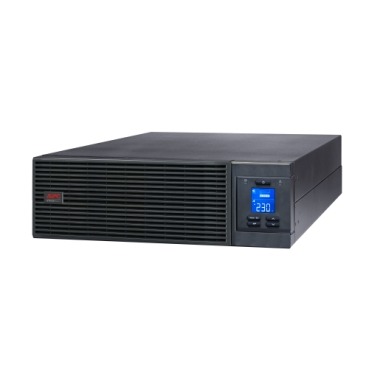
If your APC Smart-UPS or Easy-UPS Online is sitting in a server rack that nobody physically checks every hour, you’re relying on beeps and blinking LEDs to tell you when something is wrong. For a single desktop that’s fine. For a business-critical server room, it isn’t. This is where APC UPS remote monitoring — through a Network Management Card (NMC) or built-in SmartConnect — becomes a real buying decision, not an accessory afterthought. This guide explains what these cards actually do, which Indian businesses genuinely need one, and how to decide before you place your order.

What Does a Network Management Card Actually Do?
A Network Management Card (NMC) is a small hardware module that slots into your APC Smart-UPS and gives it an IP address on your office network. Once connected, it lets you:
- Check UPS status, load %, battery health, and input voltage from a browser or app — from your desk, another office, or your phone
- Receive email/SMS alerts on power cuts, battery low warnings, overload, or UPS faults
- Get historical event logs, useful for AMC audits and warranty claims
- Integrate with data-centre monitoring tools (SNMP, Modbus) if you run a NOC or use software like PRTG
- Trigger automatic, graceful shutdown of connected servers/NAS boxes during extended outages
Entry-level APC Back-UPS models (BX/BR series) used at homes and desks don’t support this — they’re designed for local, single-machine backup. NMC and SmartConnect are features built for Smart-UPS and Easy-UPS Online models used in racks and server rooms.
Built-in SmartConnect vs Add-on NMC2 Card
Depending on the APC Smart-UPS model you buy, remote visibility comes in one of three forms:
| Option | What it gives you | Best for |
|---|---|---|
| No card (local only) | Front-panel LCD/LED status only, no remote alerts | Single UPS, someone always on-site |
| SmartConnect (built-in Wi-Fi/cloud) | Cloud dashboard + mobile alerts, no extra hardware | Small offices, single-rack setups |
| Add-on Network Management Card (NMC2/NMC3) | Full SNMP/Modbus integration, multi-UPS monitoring, on-prem control (no cloud dependency) | Data centres, multi-branch businesses, IT teams with existing NOC tools |
Do You Actually Need One? A Quick Checklist
An NMC or SmartConnect is worth budgeting for if any of these apply to your setup:
- Your server room or rack is unmanned for stretches of the day (common in branch offices, warehouses, retail back-offices)
- You run multiple APC Smart-UPS units across different rooms or branches and want one dashboard
- Downtime has a real financial cost — billing systems, POS servers, ERP, or hosted applications
- You need auto-shutdown scripts so your NAS/servers power down safely before batteries deplete during a long outage
- Your IT/facility team already uses SNMP-based monitoring and wants the UPS on the same dashboard
If your online UPS backs up a single desktop or a small home-lab server with someone nearby most of the day, you can usually skip the card and rely on the audible alarm and front panel — the money is better spent on a slightly larger VA rating or a spare RBC battery pack.

Sizing and Buying Notes for Indian Businesses
When you’re comparing quotes, remember the NMC/SmartConnect decision is separate from VA/kVA sizing — you still need to size the UPS itself correctly for your rack load, then decide on monitoring on top. If you haven’t finalised your online UPS capacity yet, browse the full range of APC online UPS systems to match rack load, battery runtime, and available card slots before ordering. Also confirm with your reseller whether the specific Smart-UPS model you’re buying has a free NMC slot — some compact tower models ship with SmartConnect only and no physical slot for an NMC2 card, so check the datasheet before assuming you can add one later.
Frequently Asked Questions
Does every APC Smart-UPS support a Network Management Card?
No. Only models with a dedicated NMC slot (usually rack/tower Smart-UPS and Easy-UPS Online series) support the add-on card. Entry Back-UPS models do not have this slot at all.
Is SmartConnect the same as a Network Management Card?
Not exactly. SmartConnect is a simpler, cloud-based monitoring feature built into many newer APC units for basic alerts. An NMC2/NMC3 card is more advanced, supports SNMP/Modbus, and works without depending on an external cloud service — better for larger IT setups.
Can remote monitoring shut down my server automatically during a power cut?
Yes, when paired with APC’s PowerChute software on the connected server, the NMC can trigger a graceful, automatic shutdown sequence once battery runtime drops below a set threshold, protecting your data.
Will an NMC card work over Wi-Fi, or do I need a LAN cable?
Most NMC2/NMC3 cards require a wired Ethernet connection for reliability. Wi-Fi monitoring is generally only available through SmartConnect-enabled models designed for that purpose.
Shop what this guide covers
- UPS AMC & Preventive MaintenanceScheduled preventive visits, battery health checks and priority response for business-critical power.
- Genuine APC RBC replacement batteriesFactory-sealed APC Replacement Battery Cartridges with full manufacturer warranty.
- APC Back-UPS — for home & small officeLine-interactive UPS for desktops, Wi-Fi routers, CCTV and billing machines.
- APC Smart-UPS & online UPSDouble-conversion, pure sine-wave power for servers, racks and critical loads.
What size UPS do I need? »Find the battery for my UPS »Ask us on WhatsApp
Related guides
- How Long Will Your APC Smart-UPS Online Really Last? Runtime vs Load Guide for Indian Server Rooms (2026)
- Standard Runtime vs Long Runtime APC Smart-UPS Online: Which Should You Buy for Your Server Room? (India 2026)
- APC Smart-UPS Online Running Costs in India: Double-Conversion Efficiency, ECO Mode & Electricity Bills Explained (2026)
- Hardwired or Plug-In? APC Smart-UPS Input/Output Connections Explained Before You Buy (India 2026)
- APC Back-UPS Features Decoded: LCD, AVR & USB Monitoring — What Actually Matters Before You Buy (India 2026)
All UPS & power-backup guides · APC battery replacement chart · APC UPS dealer in your city