
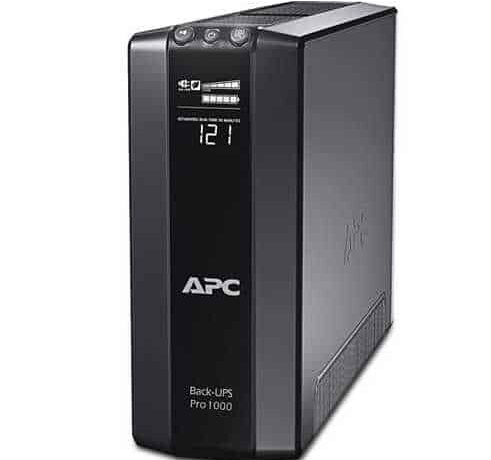
You’ve decided you need an APC Back-UPS for your home or small office. Now you’re staring at two families with similar VA ratings but very different prices: the affordable BX series and the pricier BR (Back-UPS Pro) series. The single biggest difference between them isn’t just the price tag — it’s the output waveform. BX models output a stepped (simulated) sine wave, while BR models deliver a true pure sine wave. For some devices that gap doesn’t matter at all; for others it’s the difference between smooth operation and buzzing, restarts or long-term damage. This guide helps Indian buyers decide when the extra spend on a BR is worth it — and when a BX is perfectly fine.

What the waveform difference actually means
When mains power fails, a UPS switches to its battery and inverts DC into AC to keep your equipment running. How cleanly it recreates that AC waveform is the key:
- Stepped / simulated sine wave (BX): An approximation of the smooth 50Hz sine curve using blocky steps. Cheaper to build, works fine for most robust electronics.
- Pure sine wave (BR): A clean, mains-like curve identical to what you’d get from the grid. Sensitive and modern devices simply prefer it.
In India, where load-shedding and voltage swings are common, the BX will keep your desktop and router running without issue during a normal power cut. The trouble shows up with equipment that has Active PFC power supplies — increasingly common in gaming PCs, high-end workstations and some newer appliances. These can behave erratically on a stepped waveform, sometimes refusing to switch to battery or shutting down abruptly.
BX vs BR: quick comparison
| Feature | BX Series | BR (Back-UPS Pro) |
|---|---|---|
| Output waveform | Stepped / simulated sine | Pure sine wave |
| Best for | Basic desktop, router, CCTV, LED TV | Gaming PCs, workstations, Active PFC PSUs, sensitive gear |
| Typical price | Lower | ~20–40% higher |
| LCD display | Basic (varies by model) | Detailed LCD with load/runtime info |
| AVR (voltage regulation) | Yes | Yes, wider range |
| Popular India models | BX600, BX1100, BX1000 | BR1000G, BR1500G |
When a BX is the smarter buy
Save your money and go BX if you’re powering only the common, forgiving loads found in most Indian homes and small offices:
- Standard office desktops with older or non-PFC power supplies
- Wi-Fi routers, modems and ONTs — low-power and totally waveform-tolerant
- CCTV DVR/NVR setups and IP cameras
- LED TVs, set-top boxes and basic electronics
For a router-and-CCTV corner, a compact BX600 is often all you need. For a family desktop plus router, a BX1000 or BX1100 comfortably handles the load. You can browse the full line-interactive Back-UPS range to compare VA ratings side by side.

When you should pay extra for a BR
Choose a BR (pure sine wave) if any of the following apply:
- Gaming PC or high-end workstation: Modern GPUs and Active PFC PSUs are far happier on a clean sine wave. A BR1500G is the go-to for a serious rig.
- Sensitive or medical-grade electronics: Equipment with tight power tolerances.
- Devices that buzz, click or restart on your current UPS: A classic sign of waveform incompatibility.
- You want long-term peace of mind: Clean power reduces stress on connected equipment over years of daily switchovers.
If you’re unsure whether your PC uses an Active PFC supply, check the PSU label or model — most branded units from the last few years do. When in doubt for a premium machine, a BR is cheap insurance against random shutdowns.
Sizing still matters — don’t skip it
Waveform is only half the decision. You still need enough VA/watt capacity. As a quick India rule of thumb:
- Router + CCTV (30–100W): BX600 gives generous backup — often 1–2 hours.
- Single desktop + monitor + router (200–300W): BX1000/BX1100 or BR1000G for 15–30 minutes.
- Gaming PC / workstation (400–600W): BR1500G for a safe 10–20 minute graceful-shutdown window.
Aim to keep your total load under about 70–80% of the UPS’s watt rating. This leaves headroom, protects battery life, and gives you realistic runtime. Note that a BX and BR of the same VA give similar runtimes — the BR’s advantage is waveform quality, not longer backup. When the internal battery eventually ages (typically 3–5 years in Indian heat), you can restore performance with a genuine APC RBC replacement battery cartridge rather than buying a whole new unit.
FAQ
Will a stepped sine wave BX damage my equipment?
For most standard devices — routers, CCTV, LED TVs, older desktops — no. The risk applies mainly to sensitive electronics and Active PFC power supplies, which may not transfer cleanly to battery. If your gear runs fine on a BX during a power cut without buzzing or restarting, you’re safe.
My PC restarts when the power cuts on my UPS — what’s wrong?
This is a classic symptom of an Active PFC power supply rejecting a stepped waveform, or a UPS that’s undersized/has a weak battery. Try a pure sine wave BR model, and verify your load is within the UPS’s rating.
Is the price difference between BX and BR really worth it?
For a basic home or office setup, usually not — the BX does the job for less. For a gaming PC, workstation, or any device you’ve seen misbehave on backup power, the ~20–40% premium for a BR is well worth avoiding shutdowns and long-term stress on expensive hardware.
Can I use one BR to power my PC, router and CCTV together?
Yes, as long as the combined wattage stays within about 70% of the UPS rating. A BR1000G or BR1500G can comfortably run a desktop plus low-power router and CCTV — just remember that adding more devices reduces total runtime.
Bottom line
Go BX for routers, CCTV and everyday desktops where you want reliable backup at the best price. Step up to a pure sine wave BR for gaming PCs, workstations, Active PFC power supplies or anything that misbehaves on stepped power. Size it correctly, keep the load under 70–80%, and you’ll get years of dependable protection through India’s power cuts and voltage swings.
Shop what this guide covers
- APC BR1500G-IN battery replacementThe correct RBC144 cartridge for the BR1500G-IN (1500VA).
- Genuine APC RBC replacement batteriesFactory-sealed APC Replacement Battery Cartridges with full manufacturer warranty.
- APC Back-UPS — for home & small officeLine-interactive UPS for desktops, Wi-Fi routers, CCTV and billing machines.
What size UPS do I need? »Find the battery for my UPS »Ask us on WhatsApp
Related guides
- How Long Can an APC Back-UPS Power Your Wi-Fi Router & CCTV During a Long Power Cut? (India 2026 Sizing Guide)
- APC Back-UPS Model Numbers Decoded: What BX, BV, BR & BVX Codes Mean Before You Buy (India 2026)
- Ideal Load Percentage for Your APC Back-UPS: How Much Headroom Should You Buy in 2026? (India Guide)
- APC Back-UPS Features Decoded: LCD, AVR & USB Monitoring — What Actually Matters Before You Buy (India 2026)
- APC Back-UPS vs APC Easy-UPS BVX: Should You Buy a Lithium-Ion UPS for Home or Office in India? (2026)
All UPS & power-backup guides · APC battery replacement chart · APC UPS dealer in your city