

Many Indian home and small-office buyers ask the same practical question before buying: can one APC Back-UPS run my desktop, Wi-Fi router and CCTV together — and how long will it last during a power cut? It’s tempting to plug everything into a single UPS, but whether that’s smart depends on your total load, how long you want backup, and what actually needs protection. This guide walks you through combining these three common loads on one line-interactive Back-UPS, with India-specific sizing, realistic runtimes and model suggestions.

Step 1: Add up what you actually want to power
Before picking a VA rating, list your loads and their real power draw in watts. Typical Indian home figures:
| Device | Typical draw (W) |
|---|---|
| Desktop PC (mid-range) + monitor | 150–250 W |
| Wi-Fi router + fibre ONT/modem | 15–30 W |
| 4-camera CCTV DVR/NVR + cameras | 40–80 W |
| 8-camera CCTV system | 80–150 W |
A realistic combined load: desktop (~220 W) + router (~25 W) + 4-camera CCTV (~60 W) = roughly 300 W. That’s your starting point.
Step 2: Convert watts to VA (and don’t over-buy)
APC Back-UPS units are rated in VA, but the real limit is watts. Most Back-UPS models have a power factor of around 0.6 (BX series) or 0.9 (BR series). To stay safe:
- Add ~20% headroom to your total watts for spikes and future additions. 300 W → ~360 W target.
- BX600 ≈ 360 W usable — too tight for the full combo, fine for router + CCTV only.
- BX1100 ≈ 660 W usable — comfortably handles desktop + router + CCTV.
- BR1000G (pure sine wave) ≈ 600 W usable — best if your desktop or CCTV DVR is fussy about waveform.
Never size a UPS just to “fit” the peak. Buying a slightly larger model gives longer runtime and cooler batteries — important in Indian heat.
Step 3: The runtime reality check
This is where combining loads bites. A UPS that runs a router for hours will only run a full desktop for minutes. Rough runtimes at the loads above:
| UPS | Router + modem only (~30 W) | CCTV + router (~90 W) | Desktop + router + CCTV (~300 W) |
|---|---|---|---|
| BX600 | ~40–60 min | ~15–20 min | Not recommended |
| BX1100 | ~90–120 min | ~35–45 min | ~8–12 min |
| BR1000G | ~90–120 min | ~35–45 min | ~10–14 min |
The lesson: a Back-UPS gives your desktop enough time to save work and shut down safely (8–14 minutes), while the same UPS keeps your router and CCTV alive far longer because they draw so little.
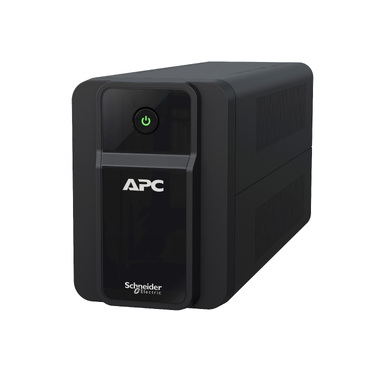
Step 4: Should you combine everything, or split it?
Both approaches are valid — choose based on your priority:
- One larger UPS (BX1100 / BR1000G): Simple, single point of protection. Best if the desktop is your main concern and you want tidy cabling. Downside: when the desktop shuts down, remaining battery still powers router/CCTV, but total runtime is dominated by the PC load.
- Two smaller UPS units: A BX1100 for the desktop, plus a small BX600 dedicated to your router + CCTV. This keeps your internet and cameras running for an hour or more even after the PC is off — ideal for work-from-home and home security.
For most Indian homes with a single desktop, one BX1100 is the sweet spot. If uninterrupted internet or continuous CCTV recording matters (frequent long cuts, security-sensitive locations), the two-UPS approach wins. You can compare capacities across the full APC line-interactive Back-UPS range to match your exact load.
Step 5: BX or BR — does waveform matter for this mix?
BX-series Back-UPS use a stepped/simulated sine wave; BR-series (Back-UPS Pro) use pure sine wave. Routers and standard CCTV DVRs tolerate stepped output fine. However, some newer desktops with active-PFC power supplies, and certain sensitive NVRs, run cooler and quieter on pure sine wave. If your PC’s PSU beeps, restarts or refuses to run on battery with a BX model, step up to a BR1000G. Read our full UPS category notes to compare series before buying.
Practical wiring & placement tips (India)
- Plug only the loads you listed — don’t add a printer, geyser or laser printer, which cause overload trips.
- Keep the UPS in a ventilated spot; heat above 30°C shortens battery life and cuts runtime.
- Use the surge-only outlets (if present) for non-critical gear and battery-backup outlets for PC/router/CCTV.
- When runtime eventually drops, you usually only need a fresh battery — see the correct APC RBC replacement battery for your model rather than a whole new UPS.
Frequently asked questions
Can I run a desktop, router and CCTV on one APC Back-UPS?
Yes. A BX1100 or BR1000G comfortably powers all three (~300 W combined) and gives about 8–14 minutes on the desktop — enough to save work — while keeping the router and CCTV running longer as the PC shuts down.
How long will a UPS keep my Wi-Fi and CCTV running during a power cut?
Because router + CCTV draw only 60–90 W, a BX1100 can run them for 35–45 minutes, and a router alone for up to 2 hours. For all-day-cut areas, dedicate a small BX600 to just those low-power loads.
Is a BX600 enough for everything?
No. A BX600 (~360 W usable) is great for router + modem + a small CCTV setup, but too small to add a full desktop. Use it as a dedicated internet/CCTV backup instead.
Do I need pure sine wave for this combination?
Not usually. Stepped-sine BX models run routers and most DVRs fine. Choose a pure sine wave BR model only if your PC’s power supply or NVR misbehaves on battery.
Bottom line: for a typical Indian home with one desktop, a Wi-Fi router and a small CCTV system, a single APC Back-UPS 1100VA is the balanced choice. If keeping internet and cameras alive through long outages is critical, add a second small unit dedicated to those loads.
Shop what this guide covers
- Genuine APC RBC replacement batteriesFactory-sealed APC Replacement Battery Cartridges with full manufacturer warranty.
- APC Back-UPS — for home & small officeLine-interactive UPS for desktops, Wi-Fi routers, CCTV and billing machines.
What size UPS do I need? »Find the battery for my UPS »Ask us on WhatsApp
Related guides
- How Long Can an APC Back-UPS Power Your Wi-Fi Router & CCTV During a Long Power Cut? (India 2026 Sizing Guide)
- Cold-Start Feature in APC Back-UPS: Why It Matters for Wi-Fi Routers & CCTV During Long Power Cuts (India 2026)
- APC Back-UPS vs APC Easy-UPS BVX: Should You Buy a Lithium-Ion UPS for Home or Office in India? (2026)
- APC Back-UPS Model Numbers Decoded: What BX, BV, BR & BVX Codes Mean Before You Buy (India 2026)
- Ideal Load Percentage for Your APC Back-UPS: How Much Headroom Should You Buy in 2026? (India Guide)
All UPS & power-backup guides · APC battery replacement chart · APC UPS dealer in your city