
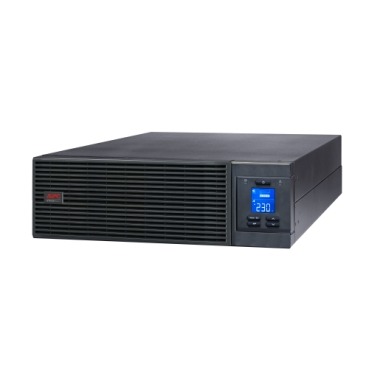
When a business outgrows a simple line-interactive UPS and starts looking at a true double-conversion online UPS for its server room, one of the first questions that comes up is not brand or VA rating — it’s phase. Should you buy a single-phase APC online UPS or a three-phase one? Get this wrong and you either overpay for capacity you’ll never use, or you buy a unit that can’t be connected to your electrical panel at all. Here’s how to decide, based on load size, your existing wiring, and where your business is headed.

What Single-Phase and Three-Phase Actually Mean Here
Every online UPS has an input side and an output side, and each can be single-phase or three-phase. In India, most commercial buildings receive a three-phase supply at the main panel, but individual floors, server rooms, or IT racks are usually wired off just one phase (single-phase, 230V). A single-phase-input/single-phase-output online UPS plugs straight into this kind of supply. A three-phase unit needs a proper three-phase input (and often three-phase output too) and is meant for much larger, building-level loads.
How to Know Which One Your Business Has
- Check the incoming supply to your server room: if it’s a standard 15A/16A socket or a single MCB feeding one live wire, you’re on single-phase.
- Check your electricity bill/meter: commercial three-phase connections are usually explicitly billed as such, and the meter has multiple current transformers.
- Ask your electrician or facility team: they will know if the DB (distribution board) at your server rack is single-phase or three-phase tapped.
- Look at your total connected IT + AC load: loads under roughly 10 kVA are almost always single-phase in Indian offices; above that, three-phase becomes common.
Typical Load Ranges and Where Each Fits
| Load Profile | Recommended UPS Type | Typical Capacity |
|---|---|---|
| 1–3 servers, small NAS, switches in a single rack | Single-phase online UPS (e.g., APC Easy-UPS SRV/SRT range) | 1–3 kVA |
| Full server rack with multiple hosts, storage, networking | Single-phase online UPS, higher capacity | 5–10 kVA |
| Small data centre, multiple racks, or shared IT + light industrial load | Three-phase input online UPS (single-phase output often retained for IT loads) | 10–20 kVA |
| Data centre floor, large manufacturing/commercial facility with heavy critical load | Full three-phase input/output online UPS | 20 kVA and above |
Why Businesses Get This Wrong
Two common mistakes show up repeatedly with Indian buyers upgrading from a basic line-interactive setup to a true online UPS:
- Buying three-phase capacity for a single-phase load. This means paying for extra wiring, a dedicated three-phase feed, and a bigger footprint you don’t need for a two- or three-server rack.
- Buying single-phase capacity and outgrowing it fast. If your IT load is expected to double within 2–3 years (more racks, new servers, added storage), sizing only for today’s load on a single-phase unit means a forced re-purchase later. It’s often more cost-effective to plan the phase decision around your 3-year roadmap, not just this year’s rack.
Wiring and Cost Implications
Three-phase online UPS systems need a dedicated three-phase input feed from your building’s main panel, proper earthing, and usually a qualified electrician for commissioning — this adds to installation cost and lead time. Single-phase units are simpler to install (often just a 16A/32A socket) but cannot scale beyond a certain kVA ceiling without paralleling multiple units. If your business plans to expand IT infrastructure meaningfully, discuss both the phase and the possibility of N+1 redundancy with your vendor at the same time, since redesigning wiring later is far more disruptive than doing it once, correctly, at purchase time.
Decision Checklist
- Total critical load today, in kVA — get this from your IT/facility team, not a guess.
- Expected load growth over the next 2–3 years.
- What phase your building’s server room panel is actually wired for right now.
- Whether battery runtime needs (for graceful shutdown vs extended backup) push you toward external battery cabinets, which some three-phase models support more easily.
- Budget for wiring changes if you need to move from single-phase to three-phase input.
FAQ
Can I run a three-phase online UPS on a single-phase supply?
No. Three-phase input units are designed to draw balanced current across three phases and generally cannot be safely operated on a single-phase feed without significant re-engineering, which defeats the purpose of buying that model.
Is a single-phase online UPS less reliable than a three-phase one?
No — reliability comes from the double-conversion topology and battery quality, not the phase count. Single-phase online UPS units like the APC Easy-UPS SRV deliver the same clean, regulated sine-wave output; three-phase is purely about handling larger total load and balancing current across a building’s supply.
What if my load is borderline, around 8–10 kVA?
Stay on single-phase if your growth plans are modest and your building’s server room is already single-phase wired. Move to three-phase only if you’re planning a genuine data-centre-style expansion, since the wiring change is disruptive to redo later.
Does replacing batteries differ between single-phase and three-phase online UPS?
The battery cartridges themselves follow the same RBC numbering logic regardless of phase — you can check our APC RBC battery range once you know your UPS model number, since phase only affects the power path, not the battery pack.
Getting the phase decision right at purchase avoids costly rewiring later and ensures your server room’s backup power scales with your business rather than against it. If you’re unsure which category fits your load, it’s worth a quick load audit with your electrician before finalising a model.
Shop what this guide covers
- Which APC UPS for Servers & Server Racks?Load table, VA sizing and the genuine APC units we stock for it.
- Genuine APC RBC replacement batteriesFactory-sealed APC Replacement Battery Cartridges with full manufacturer warranty.
- APC Back-UPS — for home & small officeLine-interactive UPS for desktops, Wi-Fi routers, CCTV and billing machines.
- APC Smart-UPS & online UPSDouble-conversion, pure sine-wave power for servers, racks and critical loads.
What size UPS do I need? »Find the battery for my UPS »Ask us on WhatsApp
Related guides
- Where Should You Install Your APC Online UPS? Noise, Heat & Space Checklist Before You Buy (India 2026)
- How Long Will Your APC Smart-UPS Online Really Last? Runtime vs Load Guide for Indian Server Rooms (2026)
- APC Smart-UPS Online Running Costs in India: Double-Conversion Efficiency, ECO Mode & Electricity Bills Explained (2026)
- Do You Need an Isolation Transformer with Your APC Online UPS? (India Buying Guide 2026)
- APC Smart-UPS SRT vs SMT vs SMC: Which One Is Actually Online? (India Buying Guide 2026)
All UPS & power-backup guides · APC battery replacement chart · APC UPS dealer in your city