
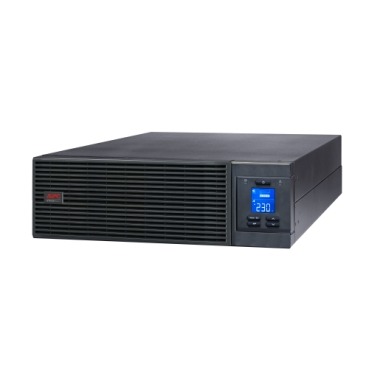
If you are shopping for a UPS to protect a server, NAS, POS billing system or a small rack, you have probably noticed APC sells two very different families: line-interactive Back-UPS Pro / Easy-UPS BVX and true online (double-conversion) Smart-UPS / Easy-UPS SRV. Both claim to give ‘clean, backed-up power’, but they behave very differently when Indian grid power misbehaves — voltage swings, frequent micro-cuts, generator changeovers, and long outages. Picking the wrong topology means either overpaying for protection you don’t need, or under-protecting a server that can’t tolerate even a 4-6ms transfer gap. Here’s how to decide correctly.

What’s actually different: transfer time vs zero transfer
A line-interactive UPS (like the APC Back-UPS Pro BR series or Easy-UPS BVX) normally passes filtered mains power straight through, and only switches to battery/inverter when it detects a problem — this switch takes a few milliseconds. For a desktop PC or a home router, that gap is invisible. For a server with sensitive storage controllers, active database transactions, or industrial equipment, even a tiny break can cause a reboot, a corrupted write, or a dropped session.
A true online (double-conversion) UPS, such as the APC Smart-UPS or Easy-UPS SRV, continuously converts incoming AC to DC and back to AC to power your load — the battery is always ‘in the loop’. There is no transfer time because the output is never actually switched; it’s always inverter-generated. This is why online UPS is the standard for server rooms, hospitals, ISPs, and data closets.
Why this matters more in India than in most countries
- Frequent voltage sag/surge: Indian LT supply regularly swings 160V-260V, forcing line-interactive units into frequent AVR/battery-boost switching cycles, which adds wear even before a full outage happens.
- Generator changeover: When mains fails and a DG set kicks in, frequency and voltage briefly wobble. Online UPS rides through this cleanly; line-interactive units may transfer to battery repeatedly during changeover.
- Long, unpredictable outages: Many towns and industrial estates see outages lasting well beyond a typical 10-15 minute battery pack, making external battery packs (common on Smart-UPS/SRV) essential rather than optional.
- Sensitive storage hardware: RAID controllers, SSD write caches, and virtualization hosts are far less tolerant of even brief power interruption than a desktop.
Side-by-side comparison
| Feature | Line-Interactive (BR / BVX) | True Online (Smart-UPS / SRV) |
|---|---|---|
| Transfer time | 2-6 ms (near-instant, not zero) | 0 ms — always inverter-powered |
| Output waveform | Pure sine wave (on BR/BVX models) | Pure sine wave, tightly regulated |
| Best for | Desktops, workstations, small routers, POS terminals | Servers, NAS, racks, VoIP/EPABX, medical & industrial gear |
| Voltage regulation | AVR (stepped correction) | Continuous, no switching needed |
| Typical VA range (APC) | 600VA to 1500VA | 1kVA to 10kVA+ (rack/tower) |
| Runtime extension | Limited, usually internal battery only | External battery packs commonly supported |
| Price band | Lower | Higher (justified for critical loads) |
When line-interactive is genuinely enough
Not every device in an office needs online protection. If you’re backing up a single desktop, a Wi-Fi router, a small billing printer, or a couple of monitors, an APC Back-UPS Pro (BR) or Easy-UPS BVX line-interactive unit with pure sine wave output is more than adequate and considerably more affordable. Reserve online UPS budget for the equipment that truly cannot tolerate any interruption.

When you should insist on online UPS
- You run a physical or virtual server, NAS, or SAN that stays powered 24×7.
- Multiple devices (switches, servers, storage) share one rack and one power feed — a single glitch affects everyone downstream.
- Your business runs billing, ERP, or database software where a mid-transaction reboot means data loss or reconciliation headaches.
- You already use a DG set for backup and need the UPS to smooth the changeover, not just cover outages.
- Compliance or SLA requirements specify zero transfer time or tightly regulated sine-wave output.
If your setup fits any of these, it’s worth browsing APC’s online UPS range rather than stretching a line-interactive model beyond its intended use. For mixed environments — say, a rack with a server plus a few desktops — many Indian businesses run one online UPS for the rack and separate line-interactive units for individual workstations, which is usually more cost-effective than over-sizing a single UPS for everything.
Sizing basics before you buy
Once you’ve picked topology, size correctly: add up the actual wattage of everything on that UPS (not just VA nameplate), apply the UPS’s power factor, and add 20-30% headroom for future growth and inrush current at power-up. Undersized online UPS units are a common reason businesses report shorter-than-expected runtime or overload alarms soon after installation.
FAQ
Can a line-interactive UPS damage my server over time?
Not damage exactly, but frequent AVR switching under constant voltage fluctuation adds electrical stress and can shorten battery life faster than in a stable online topology. For always-on servers, online UPS reduces this wear.
Is online UPS overkill for a small 1-2 server office?
Not if that server hosts your billing, accounting, or shared files. A compact 1kVA-3kVA online unit is a reasonable, worthwhile investment for the protection it gives a business-critical machine.
Do online UPS units need special maintenance?
They need periodic battery health checks like any UPS. If your unit uses external RBC battery packs, check our APC RBC battery range when it’s time for replacement, and match the exact part number for your model.
Should I add a stabilizer in front of an online UPS?
Generally no — online UPS already regulates voltage continuously, so a separate stabilizer is redundant. Stabilizers are more relevant ahead of line-interactive UPS units or non-UPS appliances.
Shop what this guide covers
- APC BR1500G-IN battery replacementThe correct RBC144 cartridge for the BR1500G-IN (1500VA).
- Which APC UPS for Servers & Server Racks?Load table, VA sizing and the genuine APC units we stock for it.
- Genuine APC RBC replacement batteriesFactory-sealed APC Replacement Battery Cartridges with full manufacturer warranty.
- APC Back-UPS — for home & small officeLine-interactive UPS for desktops, Wi-Fi routers, CCTV and billing machines.
What size UPS do I need? »Find the battery for my UPS »Ask us on WhatsApp
Related guides
- APC Smart-UPS SRT vs SMT vs SMC: Which One Is Actually Online? (India Buying Guide 2026)
- How Long Will Your APC Smart-UPS Online Really Last? Runtime vs Load Guide for Indian Server Rooms (2026)
- APC Line-R Stabilizer Specs Decoded: Which Features Actually Matter Before You Buy (India 2026)
- Is Your Server Room Ready for an APC Online UPS? A Site-Readiness Checklist (India 2026)
- Does Your APC Online UPS Need a Maintenance Bypass Switch? A Server Room Buying Guide (India 2026)
All UPS & power-backup guides · APC battery replacement chart · APC UPS dealer in your city