
Written and reviewed by Subrahmanya S Hegde — Senior Engineer, 30 years with APC UPS systems.
“Should I buy a UPS or an inverter?” is one of the most common power-backup questions in India. They solve different problems. A UPS protects sensitive electronics from every power cut, however short. An inverter runs ordinary household loads for hours.
The short answer: buy a UPS for a computer, router, CCTV or billing machine. Buy an inverter for fans, lights and TVs through long outages. Many homes and shops need one of each.
UPS vs inverter at a glance
| UPS | Home inverter | |
|---|---|---|
| Switchover to battery | A few milliseconds on a line-interactive UPS. Zero on an online UPS. Your computer does not restart. | Usually slower, and it varies a lot by model. Many basic inverters are slow enough to restart a PC or drop a router. |
| Best for | Computers, routers, CCTV and DVR, billing and POS, medical and sensitive equipment | Fans, lights, TV, whole-home loads |
| Typical backup time | Minutes to a couple of hours, depending on load and battery | Several hours, using a large external battery |
| Battery | Small sealed battery, usually inside the unit, with no topping up | Large tubular lead-acid battery. Many need periodic water top-up. |
| Power quality | Voltage regulation built in on line-interactive and online models | Varies. Check the output waveform before connecting electronics. |
| Motor loads (fans, fridge, AC) | Not designed for them. Do not connect them to a Back-UPS. | Designed for them, within the inverter’s rating |
The core difference: switchover time
When the mains fails, a UPS switches to battery in a few milliseconds. That is fast enough that a computer does not reboot. A typical home inverter takes longer to switch. That is fine for fans and lights, but it can restart a PC or interrupt a router.
What each one is best for
Choose a UPS if you are protecting
- A desktop PC, laptop dock or workstation
- A Wi-Fi router and ONT, so calls and work continue
- CCTV cameras and the DVR or NVR
- A billing PC, POS machine and barcode scanner
- Medical or lab equipment that must not lose power
Choose an inverter if you are powering
- Fans and lights through a long outage
- A TV and set-top box
- Whole-home loads for several hours
Runtime: why a UPS is a short bridge
A UPS is built to bridge short cuts and give you time to save work and shut down safely. The runtime depends on the load: a router can run for hours, a desktop PC for tens of minutes, on the same battery. You can estimate yours with our UPS runtime calculator, or read how to calculate UPS backup time.
If you need hours of backup for computers, you have two options. Choose a UPS that supports external battery packs, or pair a UPS (for the critical load) with an inverter (for everything else).
For a small business
Most Indian shops use both. An inverter handles lighting and fans. A UPS is dedicated to the billing PC, router and CCTV so they never blink. Size the UPS to the critical load only, which is usually small. Our VA to watts calculator and UPS size calculator make that quick.
Which UPS to buy
For a model-by-model comparison of APC Back-UPS against inverter setups, read APC Back-UPS vs home inverter: which should you buy. For a ready-made recommendation by use, see our pages for a desktop PC, Wi-Fi router, CCTV and billing and POS.
Frequently asked questions
Can a UPS replace an inverter?
Not for whole-home use. A UPS is made for short backup of electronics. It is not designed to run fans, a fridge or an AC for hours.
Why does my computer restart on an inverter?
The inverter takes too long to switch to battery, so the computer loses power briefly. A UPS switches in milliseconds and avoids this.
Can I run a fan or fridge on a UPS?
Not on a Back-UPS. Those motor loads can overload it. Use an inverter for them.
Is a UPS cheaper than an inverter?
A small UPS costs less than an inverter with a large battery, but they do different jobs, so the cheaper one is the one that fits your load. For a computer and router, a UPS is the right and the lower-cost choice.
How long will a UPS run my computer?
Usually tens of minutes on a standard battery for a desktop PC and monitor. A router alone can run for hours. Use the runtime calculator for your numbers.
Do I need both a UPS and an inverter?
Many homes and shops do. The inverter keeps lights and fans on for hours, and the UPS keeps the computer, router and CCTV from ever switching off.
Not sure what you need? Tell us what you want to keep running at [email protected] or on 9513996931 and we will recommend a setup.
Shop what this guide covers
- UPS Size Calculator — What Size UPS Do I Need?Work out what size UPS you need. Add your devices, get the watts, headroom and VA rating, and the APC model that fits — free UPS sizing calculator.
- UPS Runtime Calculator — How Long Will My UPS Last?Estimate how long your UPS will run in a power cut. Enter your APC model or battery and your load in watts for a backup-time estimate.
- VA to Watts Calculator for UPS SystemsConvert UPS VA to watts and back. Understand power factor and why an 1100VA UPS does not support 1100 W of load.
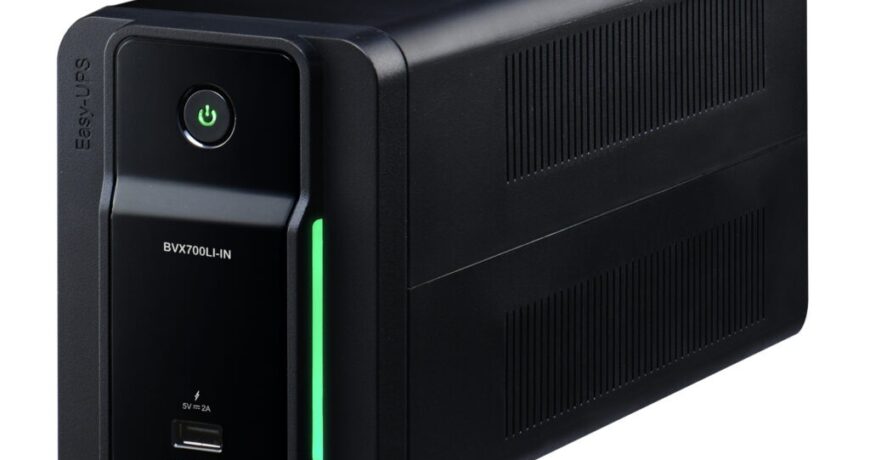
- APC Back-UPS — for home & small officeLine-interactive UPS for desktops, Wi-Fi routers, CCTV and billing machines.
What size UPS do I need? »Find the battery for my UPS »Ask us on WhatsApp
Related guides
- APC Back-UPS vs Home Inverter: Which Should You Buy for Power Backup in India? (2026 Guide)
- Is an APC Extended Warranty Pack Worth the Cost? An ROI Guide for Indian Businesses (2026)
- APC AMC Response-Time SLAs Explained: 4-Hour vs 8-Hour vs Next-Business-Day (India 2026)
- AVR in Your APC Back-UPS vs a Separate APC Line-R Stabilizer: Do You Need Both? (India 2026 Guide)
- Zero Transfer Time: Why It Matters When Buying an APC Online UPS for Your Server (India 2026)
All UPS & power-backup guides · APC battery replacement chart · APC UPS dealer in your city